
 ChatGPT
 Perplexity AI
 Claude
Crafting your office staff resume doesn't have to be a stressor. You tame the chaos, shape agendas, and oil the organizational cogwheels—your role is pivotal. Use our practical tips, real-life examples, and easy-to-edit samples to clearly highlight your value and help you stand out to employers.


 See more examples like these
- Explore resume samples tailored to different levels of experience
- Proprely format your office staff resume
- Create a compelling resume summary or objective
- Select the best skills to put on your office staff resume
- Describe your office staff work experience efficiently
- Leverage your education section
- Choose relevant additional sections for you office staff resume
- Avoid common mistakes in your office staff resume
- Include a relevant office staff cover letter
- Find useful job search resources for office staff members
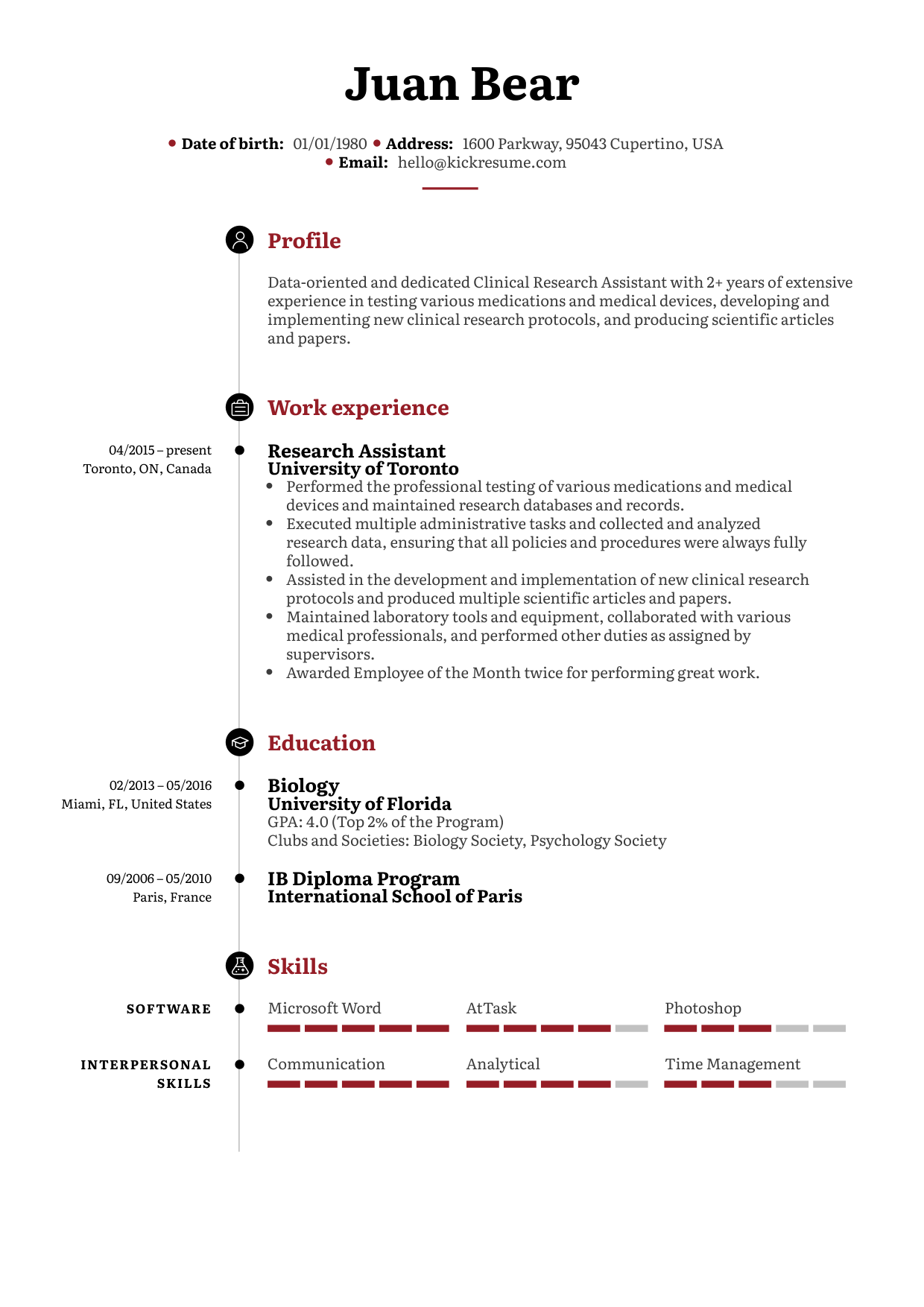
Administrative officer resume example


Why does this resume work?
- Clear and inviting profile statement: The candidate opens with a summary that is positive and easy to read, making a strong first impression about their skills and attitude.
- Shows achievements, not just tasks: The work experience section highlights concrete successes, like receiving awards and implementing improvements, which helps the applicant stand out from others.
- Great academic background: Top grades, distinctions, and club participation show that the applicant is motivated and accomplished, both in and out of the classroom.
What could be improved?
- Highlight more specific results: Some duties in the work history could include clearer results or numbers to better demonstrate impact and value.
- Add more teamwork or leadership examples: Including examples of leading projects or mentoring others would further support the applicant’s ability to work well with teams.
Office clerk resume example

Why does this resume work?
- Strong certification highlight: Including a certification (Certified Office Manager) right in the profile immediately boosts credibility and shows a commitment to professional growth.
- Demonstrates cost-saving impact: By mentioning the reduction of unnecessary costs when updating policies and procedures, the applicant shows they don’t just do tasks, but actively improve the organization.
- Recognition and awards: Listing the “Top Collaborator Award” and “Employee of the Month” signals that their hard work and teamwork are valued by employers.
- Balanced language and tech skills: Knowledge of multiple languages along with diverse computer skills makes this candidate adaptable for many office settings.
What could be improved?
- Profile could target soft skills more: The summary could mention people skills such as communication or teamwork to give a fuller sense of their strengths in the office environment.
- Job responsibilities could be more specific: Some points in work experience could use more detail or numbers to describe achievements (e.g., “reduced costs by 15%” or “served 50+ clients daily”).
Office manager resume example

Why does this resume work?
- Shows leadership in process improvement: The applicant highlights experience developing cost-saving policies and optimizing productivity—demonstrating initiative and real impact in the workplace.
- Recognized for contributions: Receiving “Employee of the Month” and acknowledgment from senior management shows consistent recognition and value delivered to employers.
- Supports diverse teams: Managing support for 80+ employees across multiple departments and cultures (supported by language abilities) illustrates excellent capacity for collaboration in large or global organizations.
What could be improved?
- Profile could target soft skills more: The summary could mention people skills such as communication or teamwork to give a fuller sense of their strengths in the office environment.
- Job responsibilities could be more specific: Some points in work experience could use more detail or numbers to describe achievements (e.g., “reduced costs by 15%” or “served 50+ clients daily”).
1. The most suitable format for your office staff resume
What's the best format for your office staff resume? The one that catches the eye of a hiring manager and makes them interested in your resume content.
To properly plan your resume, use the following cannot-go-wrong tips, and you'll soon be formatting your manager’s agendas.
- Use a clear and organized resume layout: Arrange your contact details, skills, work experience, and education in separate sections with clear headings: This helps both hiring managers and resume scanning systems easily find the information they need.
- Remember to use white space: Create enough room between your CV sections, and improve your resume readability and appeal.
- Avoid stylish fonts: Make it simple. Selecting a proper font can come with a headache. Suffer no more. Stylish fonts may easily deflect a hiring manager’s attention from the content. Instead, choose a classic, neatly-looking font, such as Calibri or Cambria.
- Present your work experience and education clearly: For each section, use bullet points to highlight your most important responsibilities and achievements. This helps employers quickly see your strengths and understand your career progression at a glance.
There are three main resume formats to choose from:
- Chronological: This is the most common and preferred by employers. It lists your work experience starting with the most recent job and is ideal if you have a steady work history.
- Functional: This format focuses on your skills and abilities, placing them above your work history. It’s useful if you’re changing careers or have gaps in employment.
- Hybrid (Combination): This format blends both chronological and functional styles, highlighting your key skills at the top, followed by a detailed work history. It works well if you want to showcase both relevant skills and experience.
Choose the format that best matches your work background, and use a well-designed template to make your resume shine.
Try our AI Resume Writer and have your resume ready in minutes!

2. How to create a compelling resume summary or objective
A strong opening statement is your resume’s best chance to grab a hiring manager’s attention. But should you use a professional summary or a resume objective? Here’s how to tell the difference—and how to write one that stands out.
Summary vs. objective
Professional summary is a brief overview (2–4 sentences) of your most relevant experience, achievements, and key skills. It’s best for candidates with some work history, as it highlights what you’ve already accomplished and how you add value.
Resume objective is a short statement about your career goals and what you aim to contribute. It’s especially useful for recent graduates, career changers, or those with employment gaps. Objectives should show how your skills and motivation match the needs of the role.
What makes a great summary or objective?
- Tailored: Matches the specific requirements and keywords of the job you’re applying for.
- Focused: Includes only the most relevant experience, skills, or goals for the position.
- Concrete: Uses specific achievements or skills (if summarizing experience), or a clear goal (if using an objective).
- Employer-oriented: Explains what you can do for the company, not just what you want.
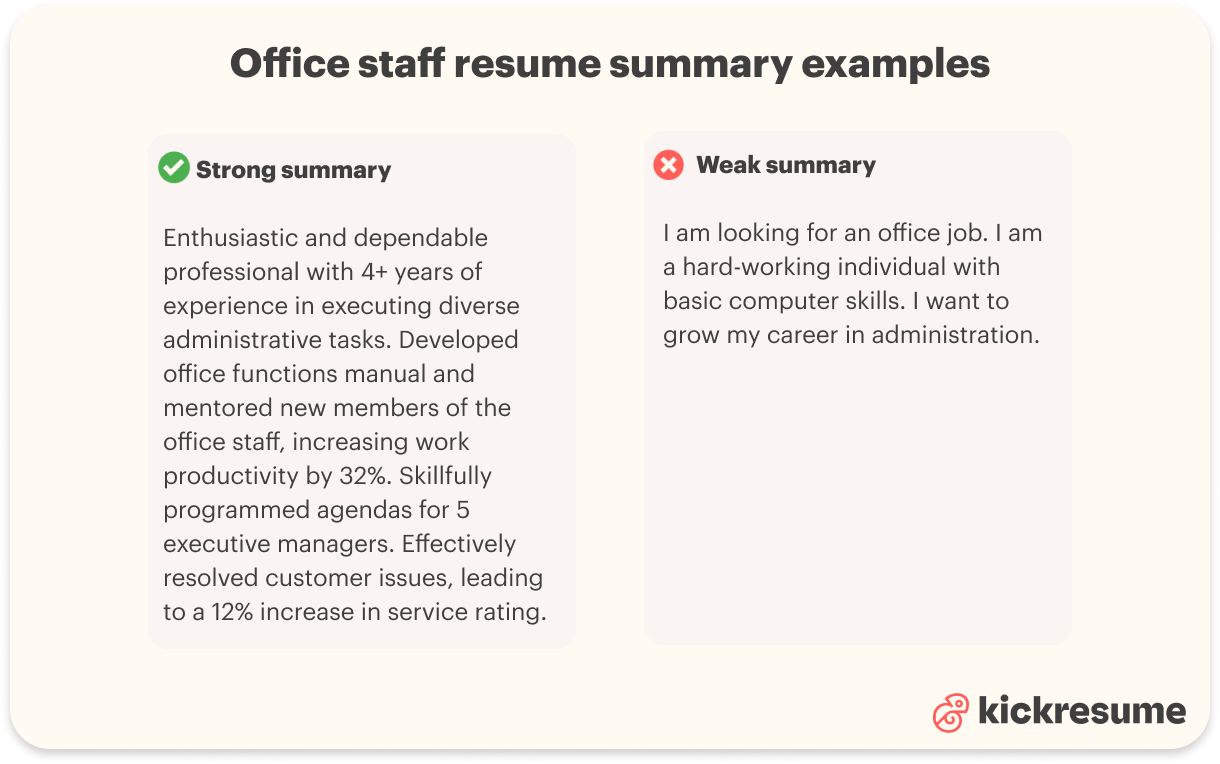
Bad example of an office staff resume summary
I am looking for an office job. I am a hard-working individual with basic computer skills. I want to grow my career in administration.
Why is it so bad? This summary is too vague and self-focused. It doesn’t mention any specific experience, skills, or results, and tells the employer what you want, rather than what you can offer. There’s no evidence you can succeed in an office setting or add value to the team.
Good example of an office staff resume summary
Enthusiastic and dependable professional with 4+ years of experience in executing diverse administrative tasks. Developed office functions manual and mentored new members of the office staff, increasing work productivity by 32%. Skillfully programmed agendas for 5 executive managers. Effectively resolved customer issues, leading to a 12% increase in service rating.
Why does it work? This summary works because it is specific and achievement-oriented. It gives a clear picture of your skill set, includes measurable results, and shows that you take initiative and make a real impact in the office environment.
Bad example of an office staff resume objective
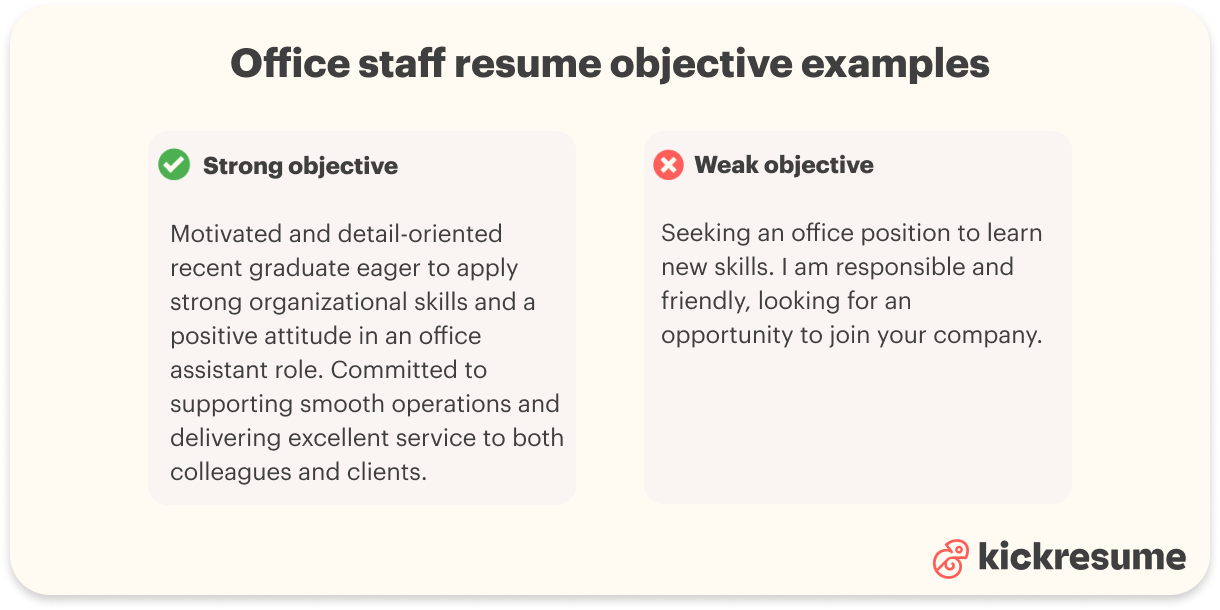
Seeking an office position to learn new skills. I am responsible and friendly, looking for an opportunity to join your company.
Why does it fall flat? This objective is problematic because it only talks about what you hope to gain, not what you have to offer. It is generic and could apply to almost any job applicant, making it unlikely to get a hiring manager’s attention.
Good example of an office staff resume objective
Motivated and detail-oriented recent graduate eager to apply strong organizational skills and a positive attitude in an office assistant role. Committed to supporting smooth operations and delivering excellent service to both colleagues and clients.
Why does it stand out? It highlights relevant strengths and shows clear intent to contribute to the employer’s needs. It’s focused on the value you can bring to the team, even as someone early in their career.
Writing a great summary or objective isn’t just about ticking boxes—it’s about giving the hiring manager a real sense of who you are and how you’d make life easier for their team. It can bring your resume to life, showing not only what you can do, but also the positive impact you’ve had in past roles, big or small.
Professional tip: After you finish your resume, read your summary or objective out loud. Does it sound like you? Does it clearly show the difference you could make on someone’s busiest day in the office? If you feel a genuine sense of pride or see where you’ve added real value, you’ll know you’ve written something that goes beyond words on a page—and that’s what makes hiring managers want to meet you.
3. What are the best skills to put on your office staff resume
You have outstanding interpersonal, organizational, and time management skills. You are dependable, flexible and always ready to excel in any task. All this is great, but guess what. So is Sally.
The following tips will guide you on how to build a better-than-Sally’s office staff skill set:
- Draft a list of your professional soft and hard skills.
- Go back to the job posting in question and target the requirements that match the skills in your draft.
- Mention these competencies at the top of the list.
- Include the rest of your skills, making sure they are relevant to the job.
- Add proficiency levels whenever appropriate.
Soft vs hard skills for office staff
Before jumping into the examples, let’s clarify what soft skills and hard skills mean, especially for an office staff role. Soft skills are your interpersonal qualities—the way you interact, communicate, solve problems, and manage your work and relationships. They ensure you fit seamlessly within teams, manage stress, adapt to change, and keep the office running smoothly.
Hard skills, on the other hand, are the technical or job-specific abilities you bring to the table. For office staff, these often include your computer proficiency, familiarity with office equipment, ability to manage documents, and skills in scheduling or accounting software.
Remember, employers look for a balance of both: soft skills demonstrate how well you work with people, while hard skills prove your capability to handle daily office tasks.
Best soft skills to put on your office staff resume
- Outstanding Spoken and Written Communication
- Effective Organization
- Problem Solving
- Customer Service
- Attention to Detail
- Professionalism
- Multitasking
- Prioritization
- Flexibility
- Ability to Work Well Under Pressure
- Dedication
Best office staff hard skills for your resume
- MS Office Suite (Superior Proficiency)
- QuickBooks (Advanced Proficiency)
- Schedule Management (Superior Proficiency)
- Data Entry
- Record Keeping and Maintenance
- Inventory and Supply Management
- Office Administration
- Multi Line Phone Systems
- Shipping
- Billing
By thoughtfully highlighting both your soft skills and hard skills, and aligning them with the job description, you’ll stand out for your professionalism, versatility, and readiness to handle any office challenge.


 See more examples like these
4. How to properly describe your office staff work experience
Make the hiring manager regret having wasted their time on reading Sally’s resume. Portray your most relevant work experience, responsibilities, and achievements in a professional and clear manner.
Use the keywords from the job posting, and link them with your unique accomplishments. Ace in the hole? Quantify your accomplishments wherever possible. Numbers speak volumes—they don’t just tell, they prove the value you’ve brought to your previous roles.
So what does perfect resume work experience contain? The ideal work experience section for an office staff resume should:
- Start with strong action verbs: Show what you did—not just what your job title was.
- Be tailored to the job ad: Incorporate keywords and phrases from the posting.
- Highlight achievements, not just duties: Show results whenever you can.
- Use quantifiable metrics: Concrete numbers make your impact stand out.
- Keep descriptions concise and relevant: Don’t overwhelm; focus on what matters most.
Bad example of an office staff work experience entry
Office Assistant ABC Company 2018–2021
- Responsible for admin work.
- Did filing and answered phones.
- Helped with payroll.
- Worked with the team.
- Resolved issues.
Why does it fall short? This example is vague and uninspiring. It relies on generic descriptions (“responsible for admin work”), lacks specific details, and doesn't highlight any outcomes. There are no numbers, no action verbs, and no indication of the value brought to the role. The hiring manager is left wondering what you actually accomplished.
Good example of an office staff work experience entry
Marknight
Office Assistant
2017 – 2021
- Demonstrated aptitude to deliver significant support for all the members of the office staff, including executing projects in favor of productive business operations.
- Administered deposits, account registry and payroll on a monthly basis.
- Developed office functions manual and mentored new members of the office staff, increasing work productivity by 32%.
- Skillfully programmed agendas for 5 executive managers.
- Effectively resolved customer issues, leading to a 12% increase in service rating.
Why does it work? This example is crisp, specific, and action-oriented. Each bullet starts with a powerful verb and provides context (“delivered significant support,” “developed office functions manual,” etc.). Achievements are backed with figures—like “increasing work productivity by 32%” and “12% increase in service rating”—which proves real impact. The focus is on results and contributions to the team, making it easy for a hiring manager to picture the candidate’s effectiveness.
But what if you have no office experience yet? Don’t worry—you can still write a compelling work history section! Here’s how:
- Focus on transferable skills:Think of volunteer work, academic projects, student group leadership, or even part-time jobs. Highlight tasks that required organization, communication, teamwork, or customer service—skills just as valuable in an office.
- Showcase relevant coursework or training: Did you complete business or IT courses? Mention them if they taught you skills you’ll use in the office.
- Include internships or externships: Even short stints count. List what you learned and achieved, using specific examples and any quantifiable outcomes.
- Emphasize willingness to learn: Demonstrating the ability to quickly pick up new tasks or systems can be just as valuable as direct experience.
Work experience entry example for a graduate or intern
Team Coordinator, University Event Committee State University 2022
- Organized and coordinated logistics for four major campus events with over 600 attendees.
- Managed scheduling, registration, and communications for student and staff volunteers.
- Implemented a new digital filing system, improving information retrieval speed by 35%.
- Collaborated with a team of seven to resolve last-minute issues, ensuring events ran smoothly and received positive participant feedback.
Why does it hit home? Even without official office work experience, this example uses action verbs, highlights relevant office-related skills (organization, communication, problem-solving), and provides measurable outcomes. It proves the candidate is ready to handle real-world office responsibilities.
Remember, whether you have years of experience or you’re just starting out, always focus on what you accomplished, how you helped others, and what quantifiable results you delivered. That’s what makes your resume stand out—even in a stack taller than Sally’s.
Find out your resume score!

5. How to leverage your education section
Listing education is easy, right? Your college name, degree and years in school. Done.
But what happens if Sally, your competitor, has the same bachelor’s degree as you? In that case, you should capitalize on the details that set you apart. This means mentioning relevant coursework, academic achievements, awards, extracurricular roles, and areas of interest that align with the office staff role. These details can help build a bridge between your background and the job requirements, showcasing skills and qualities employers value.
How and where to position your education section as a fresh graduate?
If you’re a fresh graduate or light on professional experience, your education section has more impact and should move to the top of your resume, just below the summary (if you include one) and before your work/internship experience. This way, employers see your most relevant strengths first—your academic background, standout coursework, and campus leadership.
Also, if you’re transitioning from an unrelated field, use your education to demonstrate transferable skills: teamwork, communication, organization, attention to detail, or any coursework and projects adaptable to an office environment.
Entry-level example of an education section (unrelated field)
State University BSc Environmental Science 2018 – 2022
- Relevant Coursework: Data Analysis, Information Management, Business Communication
- Organized group research projects using Microsoft Office applications
- Dean’s List, 2 semesters
- Secretary, Environmental Studies Club: Scheduled meetings, managed emails, coordinated event logistics
- Volunteer, Campus Information Desk: Assisted visitors, managed appointment sign-ups
Why does it work? This example connects your background to the office environment. Highlighted coursework shows analytical and communication skills, while club secretary work and volunteer experience directly relate to typical office tasks like scheduling, correspondence, and customer service. Even coming from a different major, you’re presenting yourself as organized, tech-savvy, and engaged.
Education section example (related field)
Westbridge College Bachelor of Science in Business Administration 2019 – 2023
- Relevant Coursework: Office Systems & Procedures, Business Communication, Spreadsheet Management, Organizational Behavior
- Office Administration Intern, Career Services Portal: Assisted with scheduling, filing, and event planning for student workshops
- Group Project: Designed and implemented a filing system for a simulated company, improving information retrieval time by 45%
- Member, Business Club: Coordinated monthly guest speaker events; managed all member communications via email and newsletter
- Awarded College Leadership Scholarship for initiative in student organizations
Why does it hit home? This example highlights not just academic background, but specific experiences and projects highly relevant to an office staff position. “Office Systems & Procedures” and “Spreadsheet Management” show direct job preparation; the internship and club coordination roles mirror real-world office responsibilities. Quantifiable results (like improving retrieval time) and scholarships further demonstrate initiative and achievement.
Tips for making your education section impactful:
- Highlight relevant courses that taught office-applicable skills (communication, computers, business, etc.).
- Show off academic awards, leadership positions, and club activities.
- Tailor your interests and achievements to reflect the soft and hard skills listed in the job description.
- Place the education section higher on your resume if you don’t have much direct experience—in other words, let your academic strengths tell your story first.
In summary, your education section is more than a degree—it's proof of your potential. By showcasing the most relevant aspects of your academic career, you give busy hiring managers a clear reason to call you in for that interview—even if Sally has the same diploma. Whether you’re switching fields or starting out, make sure this section reflects the unique value you bring to an office staff role.
6. What are the best additional sections to include in your office staff resume
They may be called "additional" or "extra", but these sections can be quite decisive, especially when taking into account a high volume of competitive resumes.
1. Volunteering activities: Including volunteer work shows you’re community-minded, versatile, and often brings additional soft and hard skills into focus. Choose activities that align with office-related competencies such as event coordination, administration, customer service, or technology. Volunteering at the Tech Fair, for instance, may convey how you embrace technology.
Example
-
Volunteer Administrator, Local Non-Profit Organization (January 2019 - June 2020)
- Assisted in organizing fundraising events, resulting in a 20% increase in donations.
- Managed volunteer schedules and coordinated team efforts for community outreach programs.
- Contributed to social media campaigns, boosting the organization's online presence by 30%.
Why does it matter? These experiences highlight transferable skills such as organization, teamwork, initiative, communication, and the use of digital tools—all of which are highly valued in an office environment.
2. Conferences, workshops, and training: Listing professional development activities demonstrates your motivation to keep learning and improving. It’s proof of ongoing commitment to your role and adaptability in a changing work environment.
Example
- Be a Better Leader International Online Conference – 2019
- Effective Office Communication Workshop, Local Business Alliance – 2023
- Introduction to QuickBooks Training, Community Tech Center – 2022
Why does it matter? These entries show you are proactive about gaining new skills, staying current with trends, and improving your professional toolkit outside of formal education.
3. Certifications and courses: Extra certifications—especially those in office administration, software applications, or project management—can really set you apart.
Example
- Microsoft Office Specialist (Excel, Word, Outlook) – 2023
- Certified Administrative Professional (CAP) – 2024
Why does it matter? Certifications are tangible proof of your expertise and professionalism. They show you’re ready to hit the ground running with essential office tools.
4. Languages: Being multilingual is a massive asset in any modern workplace, particularly those serving diverse communities or international clients.
Example
English (Native), Spanish (Conversational), French (Basic)
Why does it matter? Languages demonstrate cultural sensitivity, communication skills, and open you up for roles that involve interacting with broader groups of people.
All in all, sxtrategically selected additional sections personalize your application and add depth to your profile. When thoughtfully presented, they can highlight initiative, technical expertise, continuous learning, and community engagement—qualities that go a long way in making you the candidate hiring managers want to meet, not just another resume in the pile next to Sally’s.
7. Avoid common mistakes on an office staff resume
Crafting an impressive office staff resume requires the same level of attention to detail as coordinating a busy office—one oversight, and everything can unravel. Here’s how to avoid the most frequent pitfalls:
Don’t be vague
- Common error: “Assisted with office tasks.”
- Fix: Be specific. Instead, say “Managed daily scheduling, handled customer inquiries, and maintained digital record systems for a 10-person team.”
Skip the generic resume
- Typical misstep: Submitting the same resume to every position.
- Fix: Always tailor your resume for each job. Emphasize the organizational, software, and people skills most relevant to the role at hand.
Don’t exaggerate your role
- Misstep to avoid: “Single-handedly managed all office operations.”
- Fix: Accurately describe your work and credit team efforts where appropriate. For example: “Collaborated with a team of five to organize company events and streamline office workflows, improving efficiency by 15%.”
Watch for typos and formatting errors
- Common blunder: Misspellings, inconsistent formatting, or missing details.
- Fix: Proofread your resume carefully and have a friend or colleague review it. Tools like Grammarly can help ensure it’s spotless and professional.
Maintain a balanced perspective
- Typical problem: Either underselling your achievements or inflating your responsibilities.
- Fix: Focus on clear, outcome-based bullet points that demonstrate both your independence and your contribution to team success.
Remember, your resume is often the first introduction an employer has to your professionalism and reliability—qualities no office can run without. Make sure yours stands out for all the right reasons.
8. Include a relevant office staff cover letter
While a cover letter can sometimes be viewed as optional, it’s often your secret weapon when applying for office staff positions. Particularly when the job listing asks for one or you want to illustrate something your resume only hints at, don’t miss this opportunity.
Where your resume gives a concise overview of your skills, responsibilities, and qualifications, a cover letter tells your story. This is your chance to describe why you are the right fit for that specific office environment, share your passion for helping a team thrive, and show off your understanding of the company’s mission or culture.
A strong cover letter can reveal your professionalism, communication abilities, and genuine enthusiasm for the role—qualities that set great office staff apart. For example, it allows you to explain gaps in your resume, elaborate on a key achievement, or express your eagerness to contribute to the company’s success.
Your cover letter should not simply repeat your resume. Instead, use it to complement your application, showing how your experience and mindset align with the company’s needs. So before you hit “send” on your next application, pair your polished resume with a tailored, engaging cover letter.
Create your cover letter fast with artificial intelligence.

9. Valuable job search resources for office staff members
Job searches can sometimes feel like a daunting task, especially in a field as vast as office administration. Luckily, there are many resources tailored specifically for office staff members. Let's unveil your tool kit:
- Job search websites: General websites like Indeed or LinkedIn list countless administrative job opportunities. Use their search filters to narrow down listings that suit your credentials and preferences.
- Office admin-specific job boards: Some job boards such as iHireAdmin or OfficeTeam focus specifically on administrative and office-related roles.
- Professional organizations: Groups like the International Association of Administrative Professionals offer resources, professional development opportunities, and job postings specific to office staff roles.
- Temp agencies: Temp agencies like Robert Half or Adecco can connect you with short-term positions which sometimes convert into permanent roles.
- Local career centers: These centers often have partnerships with local businesses and offer job placement services, resume support, and interview training.
- Social media: Platforms like LinkedIn and Facebook have groups dedicated to office professionals. These can be a valuable resource for job postings and networking opportunities.
Remember, whether you're a newbie to office work or looking for your next step, these resources can assist in navigating your job search journey.
Administrative Career Outlook in 2026
Administrative jobs are expected to grow by 4% between now and 2034. That’s faster than the nationwide average for all occupations. (Source: U.S. Bureau of Labor Statistics).
And with roughly 36,400 openings expected each year, most opportunities will come from replacement needs as people retire or move on.
At the same time, AI is absorbing the repetitive parts of admin work like scheduling, document prep, and basic reporting, which means the job is shifting toward coordination, problem-solving, and tool-savvy support rather than disappearing.
Average US base salaries across popular Administrative roles:
- Administrative Clerk: $46,580/year
- Facilities Manager: $82,932/year
- Front Desk Receptionist: $35,838/year
- Office Manager: $66,715/year
- Personal Assistant: $52,908/year
These salary estimates come from Indeed (as of January 2026), and are based on anonymous submissions from workers, along with salary data from job postings on the platform over the last 36 months.
As you can see, salaries can vary significantly across roles in this field, based on location, company size or experience level. If you’re considering a career in administration, be sure to explore and compare your options carefully.
Office Staff Resume FAQ
How can I make my office staff resume stand out?
Besides showcasing your skills and experience, emphasize achievements that quantify your impact, such as improved efficiency, implemented systems, or cost-saving measures. Showing concrete results can give you an edge.
Should I include a skills section in my office staff resume?
Absolutely. A dedicated section for skills allows you to highlight your proficiency in key areas relevant to an office environment - think scheduling, customer service, database management, or even specific software proficiency.
How should I format my office staff resume?
Aim for clarity and simplicity. Use subheadings, bullet points, and clearly divided sections to make the document easy to scan. Remember, hiring managers often skim through resumes, so make yours easy to digest.
Should I customize my office staff resume for each job application?
Ideally, yes. Tailoring your resume to each job posting shows the employer that you've paid attention to the details of their job listing and can help you align your skills and experiences more accurately with what they're looking for.
Does an office staff resume need an objective or summary?
While not mandatory, a well-written objective or summary can provide a quick overview of your qualifications and aims, giving potential employers a snapshot of what you bring to the table. Tailor it to each job to make the biggest impact.






![How to Write a Professional Resume Summary? [+Examples]](https://d2xe0iugdha6pz.cloudfront.net/article-small-images/How_to_Write_a_Professional_Resume_Summary_.png)
![How to List Your Education on a Resume? [+Examples]](https://d2xe0iugdha6pz.cloudfront.net/article-small-images/How_to_Put_Education_on_a_Resume_.png)
![How to Describe Your Work Experience on a Resume? [+Examples]](https://d2xe0iugdha6pz.cloudfront.net/article-small-images/How_to_Describe_Your_Work_Experience_on_a_Resume_.png)