
 ChatGPT
 Perplexity AI
 Claude
Writing a resume in 2026 is a bit of a balancing act. On one side, you have the recruiter who spends six to eight seconds skimming your page before deciding whether you're worth a closer look. On the other, you have the Applicant Tracking System (ATS) quietly filtering applications before a human even sees them. Your resume has to win both over, and that's harder than it sounds.
The good news is that a great resume isn't about clever tricks or fancy design. It's about getting the fundamentals right: a clean format, sharp content, smart tailoring, and just enough ATS-awareness to make sure your application actually lands in front of a person.
Below are 40+ practical tips broken into categories: formatting, content, tailoring, ATS, and extras. Use it as a checklist, skim what's relevant, and skip what you've already nailed.
So let’s get into it.
Format: The form matters more than you think
Before a recruiter reads a single word, they form an opinion based on how your resume looks. Clean spacing, the right length, and a consistent layout signal that you take the application seriously and that you can communicate clearly. These tips cover the structural choices that make your resume easy to scan for humans and easy to parse for ATS.
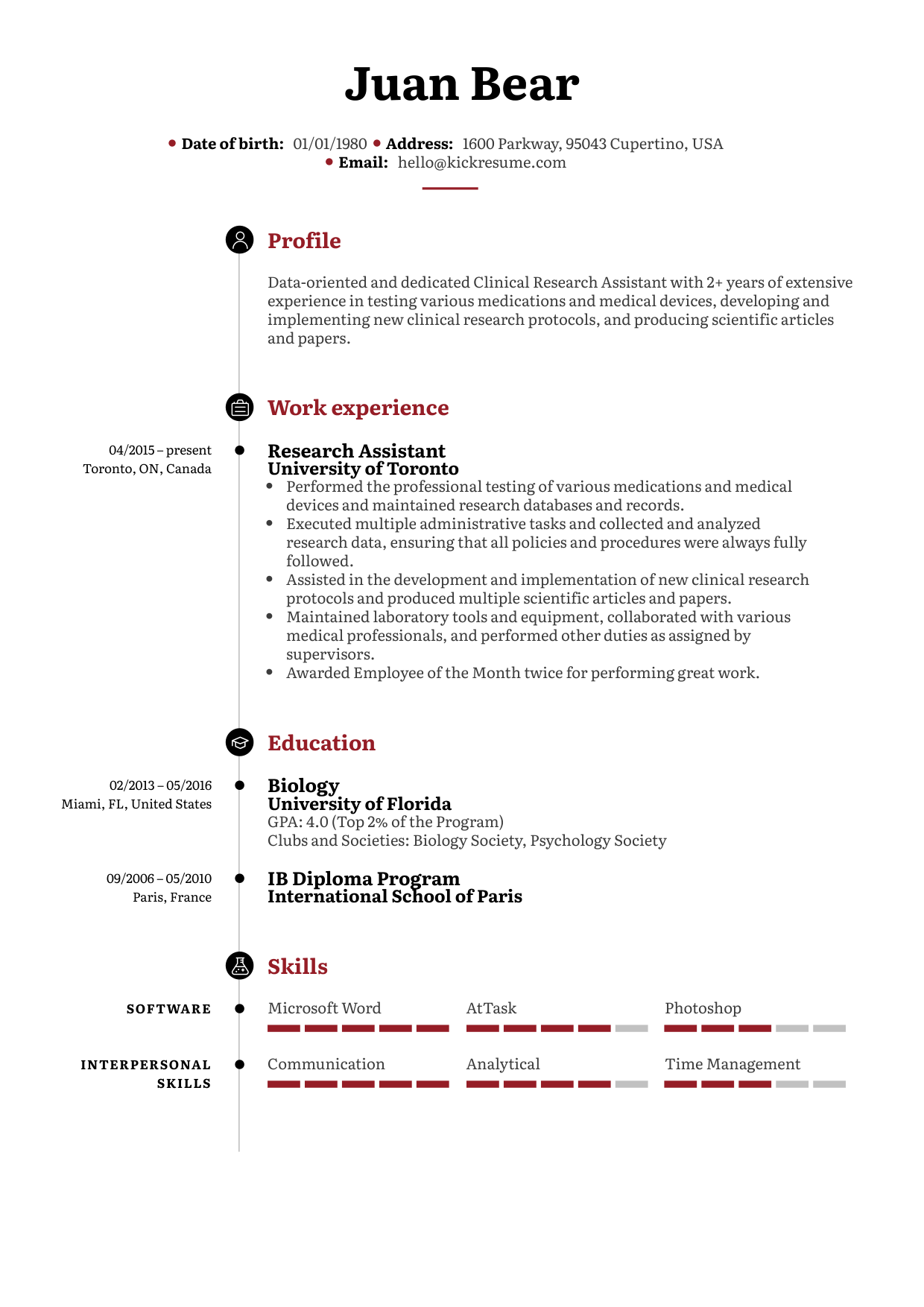
1. Pick the resume format that fits your career stage
The first thing to consider is your resume format, and it makes a big difference. Each format puts the spotlight on different parts of your resume, which helps you highlight the right things for the job you're after.
There are three main formats, and they're not interchangeable:
- Chronological. Best for experienced professionals with a strong work history. The main focus is the work experience section.
- Functional (skills-based). Focuses on your skills rather than your job history. Ideal for fresh graduates, career changers, or anyone with a big employment gap.
- Combination (hybrid). Balances both work experience and skills. Best for career changers, people returning after a short gap, or anyone aiming for career growth.
Take inspiration from these resume formats..-.
2. Keep it to one or two full pages
Aim to fit your resume on a single page if you have less than 10 years of experience, and two pages if you're a senior with a long track record.
Avoid landing on one and a half pages, as it tends to look unfinished. If you're struggling to fit everything on one page, try adjusting your margins slightly or cutting less relevant sections. Keep only what's relevant to the job you're applying for.
3. Save it as a PDF (unless told otherwise)
PDF keeps your layout intact across devices. Use .docx only when the job posting specifically asks for it. Never send an image-based PDF as the ATS can't read it.
4. Use a single-column layout
This one is optional but highly recommended. Two-column resumes look slick, but they confuse the ATS, which reads left to right, top to bottom. You can lose entire sentences mid-thought. So if you're not sure whether the company you're applying to is using an ATS, stick to a single-column layout to avoid getting filtered out for formatting reasons.
5. Stick to a clean, professional font
The standard font size is 10–12 pt. Safe, recruiter-approved choices include Arial, Calibri, Helvetica, and Times New Roman. Don't get creative here. Unusual fonts can trip up older ATS software and make your resume look unprofessional before anyone reads a word of it.
6. Set margins between 0.5 and 1 inch, line spacing 1.0–1.15
This is the sweet spot between "too cramped" and "too empty." Anything tighter starts to feel suffocating, and anything looser makes the page look padded out to hide a lack of content.
7. Use bullet points instead of paragraph walls
Recruiters scan, they don't read. Bullet points force you to be concise and make the page much easier on the eye. They also help the most important details stand out instead of getting buried inside long blocks of text.
8. Bold sparingly
Bold your section headings and job titles so they're easy to find at a glance. Don't bold whole sentences or entire bullet points, because at that point, nothing stands out and the page starts to feel shouty.
9. Keep date formatting consistent
Pick one format ("Jan 2023 – Dec 2024" or "2023 – 2024") and stick with it throughout the resume. If you go with numerals only, double-digit your months (03/2024, not 3/2024). Inconsistent dates are a small detail, but they're the kind of thing recruiters notice and quietly hold against you.
Header: Don’t overshare in the personal information section
This top section of your resume is also known as the resume header. Recruiters look here first to find out who you are and how to reach you, so the goal is to give them everything they need quickly, without clutter.
10. Include the essentials, leave out the rest
Name, professional email, phone number, location (city + country is enough), and LinkedIn. Add a portfolio link or GitHub if relevant. Skip your full home address, date of birth, and marital status.
11. Skip the photo unless your local market expects it
In the US, UK, Ireland, and Canada, photos are generally discouraged and can actually trigger bias filters or get your application rejected outright. In much of continental Europe (Germany, France, Spain, Belgium),a professional headshot is still common. Check the norms for the country you're applying in, and if in doubt, leave it off.
12. Keep your location simple
City and country is enough. There's no need to put your full street address on a resume. It takes up space, raises privacy concerns, and can lead to bias based on neighbourhood. If you're open to remote work or relocation, add a short note like "Open to remote" or "Willing to relocate" right next to your location. It saves recruiters the guesswork.
13. Use a professional email address
Always use a professional email address, yourname@gmail.com not partyboy420@hotmail.com. It can make you look unprofessional or even as a scam, putting you immediately into the trash pile. Also avoid using your current employer's email.
Summary: What the hell is a resume summary?
Your resume summary sits just below your contact details and acts as the trailer for your entire resume. It's often the only part a recruiter reads in full before deciding whether to keep scanning, which makes it one of the highest-leverage sections you'll write.
14. Write your resume summary last
Most people do it the other way around, but it's worth flipping the order. Think of your resume summary as a teaser for the whole document, which is much easier to write once everything else exists. By that point, you already know your strongest achievements, your sharpest wording, and the keywords you've used, so the summary almost writes itself.
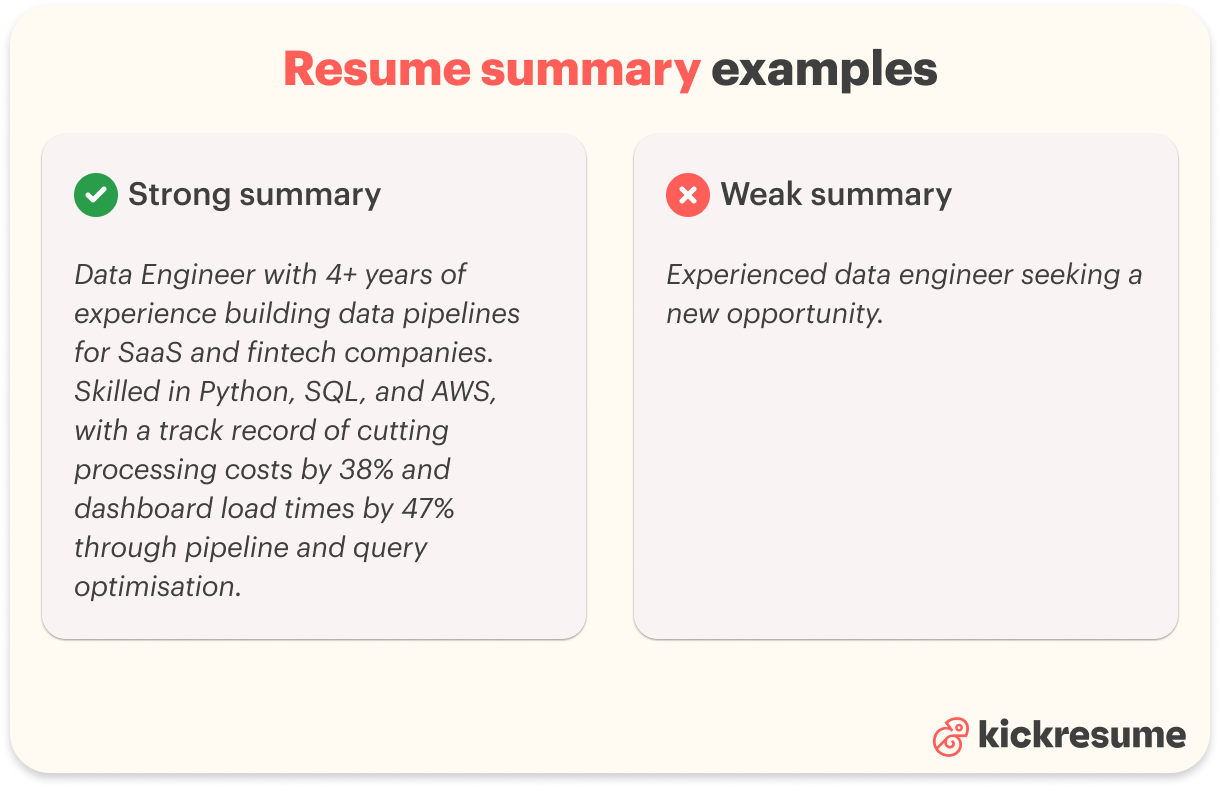
15.Start your resume summary with your title and years of experience
Your summary should immediately tell the reader who you are and what you bring to the table. A line like "Project Manager with 5+ years of experience leading SaaS rollouts up to $500K" tells the recruiter exactly who they're looking at in one sentence, which is often all the time you get before they decide whether to keep reading.
16. Keep it short
Three to five sentences or bullet points is plenty. Anything longer and you've lost the recruiter you were trying to hook. The summary is a trailer, not the whole film, so save the details for the work experience section.
17. Tailor the summary for every job
A generic summary is a wasted summary. Match the job title to the role you're applying for and pull two or three keywords directly from the listing. It takes five minutes per application and dramatically improves how recruiters and ATS read your opening line.
Experience: Stop listing duties, start listing wins
For most candidates, the work experience section is the heart of the resume. It's where recruiters look for proof that you can actually do the job, and it's the section they spend the most time reading. Strong work experience entries focus on results, not responsibilities, and tell a clear story of how you've grown over time.
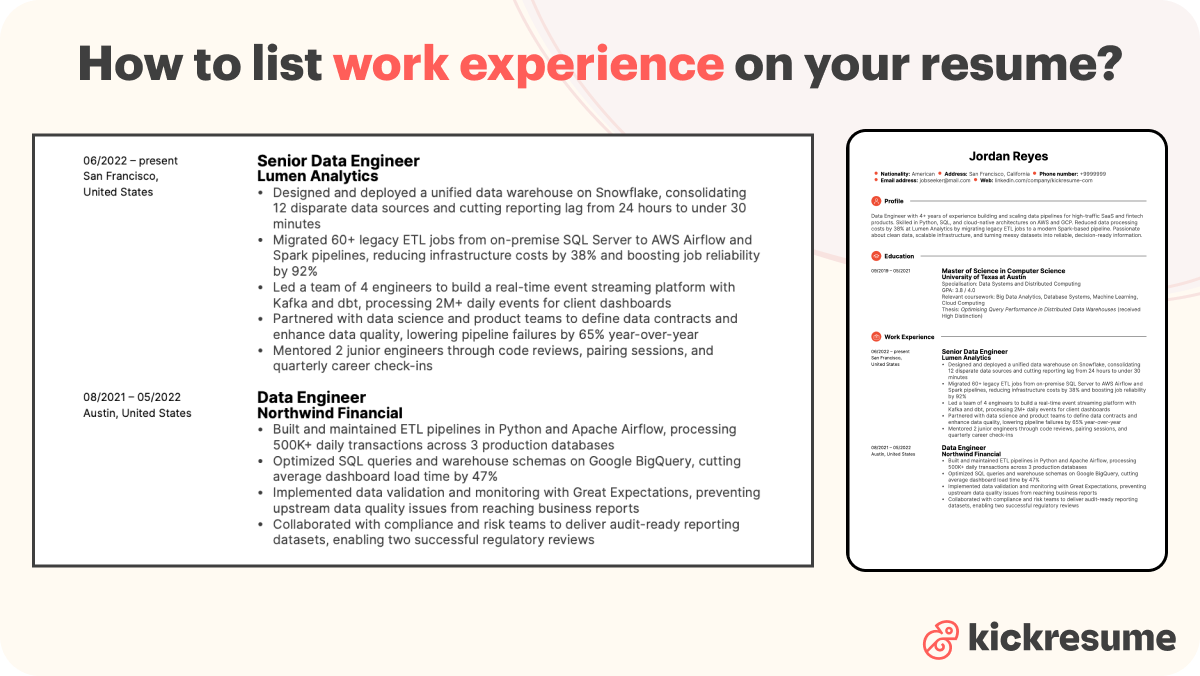
18. Use 2–4 bullet points per job
Start with a short context line that explains what the role involved, then use the bullets to show what you actually achieved. Two to four is the sweet spot. Fewer than that and your role looks thin, more than that and recruiters start skimming. Save the longest bullet lists for your most recent and most relevant roles.
19. Lead with achievements, not duties
Recruiters already know what a Marketing Manager does. Show them the impact you had, not just the title you held. It's fine to mention your most important duties for context, but the focus should be on what you accomplished while doing them.
For example, instead of "Managed the company's social media accounts," write "Grew the company's social media following by 180% in 12 months across LinkedIn and Instagram."
20. Start every bullet with a strong action verb
Words like led, launched, redesigned, negotiated, increased, automated, and streamlined make your achievements sound concrete and credible.
Skip vague verbs like "helped" or "worked on," which make it unclear what you actually contributed. Strong verbs at the start of every bullet also give the section a confident, consistent rhythm that's easier to scan.
21. Quantify everything you can
"Increased revenue by 22%" lands much harder than "increased revenue significantly." Use percentages, dollar amounts, team sizes, project timelines, customer counts, anything measurable. Numbers prove the result is real and give recruiters something concrete to remember you by. If you can't find an exact figure, a reasonable estimate is better than nothing.
22. Don't go back more than 10–15 years
It’s tempting to mention all your work you’ve done, but it’s not always the best strategy. You usually do that with a CV but with a resume (yes there’s a difference) you want to curate and tailor the content to the job you’re applying to. If you’re senior and have years of experience, carefully pick out the most relevant jobs to the new one you’re applying for. Older roles can be summarized in a single line or dropped entirely.
23. Address employment gaps honestly
Short employment gaps (under six months) don't really matter, so don't stress about them. For longer gaps, switch to year-only dates, use the functional format, or fill the gap with freelancing, courses, or volunteer work and list those experiences. They help fill the space and show the recruiter that even during your time away from full-time employment, you stayed active and built relevant skills.
Education: Yes, your GPA still matters (sometimes)
The education section can be the most important part of your resume, depending on where you are in your career. Fresh graduates should treat it as a showcase, while experienced professionals can keep it brief. Either way, a few smart choices about what to include and what to leave out can make this section work harder for you.
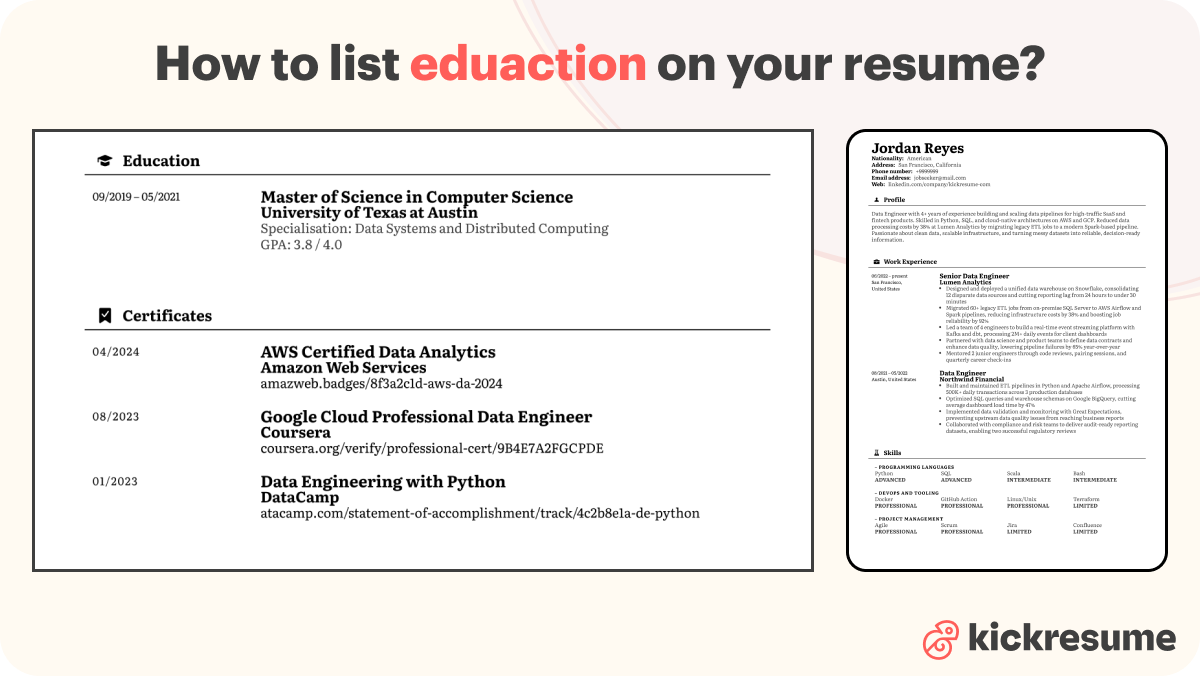
24. Always include the basics
Every education entry should include the school name, location, degree, field of study, and dates of attendance. These are the details recruiters scan for first, and missing any of them can raise unnecessary questions. If you studied abroad or attended a lesser-known institution, you can also add a short note about the program's focus or ranking
25. Add GPA only if it's 3.0 or higher and only if you're a recent grad
A strong GPA is worth highlighting early in your career, but after a few years of work experience, it stops carrying weight. Recruiters care far more about what you've done on the job than how you scored in class. If your GPA is below 3.0, leave it off entirely; no GPA is better than a weak one.
26. Drop high school once you have a college degree
Mentioning that you've completed high school is only relevant if you're currently studying, a fresh graduate, or if high school is your highest level of education. Once you have a university degree, it just takes up space you could use elsewhere and adds nothing to your application.
27. List unfinished degrees too
A dropped or paused degree is still worth including. Mark it as "coursework completed" or "in progress" with an expected completion date. Unexplained gaps in your timeline tend to look worse than an incomplete degree, and listing it gives you a chance to show off the skills and knowledge you picked up along the way.
28. Treat certifications as part of your education story
A great way to strengthen your education section is to list relevant certifications alongside your degrees. Google Analytics, PMP, HubSpot Inbound, Coursera specializations, anything from a reputable provider that ties to the role. You can include them directly under Education, or create a dedicated Certifications section if you have several worth showcasing.
Skills: Quality over quantity
The skills section is where you give recruiters and ATS a quick snapshot of what you can actually do. Done well, it acts as a keyword hub that helps you pass automated filters and gives hiring managers an at-a-glance sense of fit. Done badly, it's a generic list of buzzwords that adds nothing. These tips will help you build one that earns its place on the page.
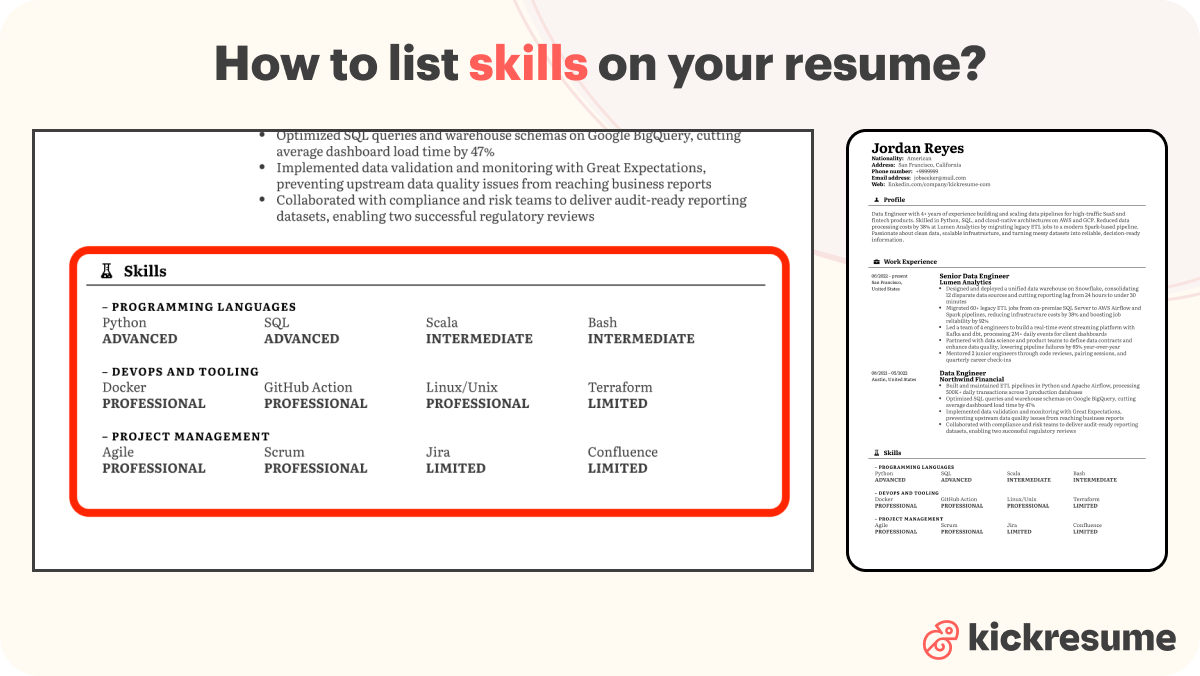
29. Group skills into categories
Organise your skills into logical groups: hard skills, soft skills, tools (with proficiency levels), and languages. A wall of mixed skills is harder to read for both humans and ATS. Categorising also makes it easier for recruiters to spot the exact skill set they're looking for, especially when scanning dozens of resumes in a row.
30. Aim for 5–10 well-chosen skills
Quality beats quantity every time. Listing 30 skills makes none of them feel real, and recruiters will stop reading after the first few. Be honest with yourself, too. Saying you "speak Spanish" when you can manage two sentences will backfire the moment someone on the interview panel switches languages. Stick to skills you genuinely use.
31. Show proficiency for hard skills
Use simple text labels like Beginner, Intermediate, Advanced, or Expert. Skip the dots, stars, and percentage bars, as ATS can't read graphics and they often look more decorative than informative. Plain text is easier for recruiters to scan and far safer for parsing software.
32. Don't list skills you can't back up with an example
Getting a skill past the ATS is one thing; defending it in an interview is another. Recruiters will ask follow-up questions, and a vague answer can sink an otherwise strong application. For every skill on your resume, make sure you have a quick story, project, or result you can point to as proof.
Tailoring: One resume to rule them all? Terrible idea.
The single biggest mistake job seekers make is sending the same resume to every opening. A generic resume might tick the basic boxes, but it rarely stands out, and it almost never beats a tailored one. Tailoring takes a few extra minutes per application, but it dramatically improves your odds of getting noticed. These tips show you exactly what to adjust, and how, for every role you apply to.
33. Research the company before you write anything
Read the "About Us" page. Note the mission, values, tone, and the language they use to describe themselves. Check their LinkedIn and recent activity, you can use that at an interview or when writing a cover letter.
34. Highlight every keywords in the job ad
Skills, tools, methodologies, repeated phrases, unusual adjectives. Those are your target keywords. You want to make sure all these keywords are incorporated into your whole resume. Both ATS and recruiters love this and favour those resumes in the selection. Or you can skip this part and let the Kickresume’s Resume Tailoring do that for you in seconds.
35. Mirror the job ad's exact wording
If they wrote "Adobe Creative Suite," don't write "Adobe Creative Cloud." If they say "B2B marketing," use both "business-to-business marketing (B2B)". ATS won't always recognize synonyms and recruiters look for these terms specifically.
36. Re-order your sections so the most relevant content comes first
The "most recent first" rule isn't absolute. If your most relevant experience is from three jobs ago, give it the spotlight. The same logic applies across your whole resume: organise your sections so the strongest, most relevant content sits where recruiters will see it first.
37. Match your design to the industry
Bank or law firm? Conservative, simple template. Design or startup role? More personality is welcome. A creative resume for a corporate gig (or vice versa) signals poor fit before anyone reads a word.
Find out your resume score!

ATS: Your real first reader isn't a person
Most companies (including small and mid-sized ones) now use Applicant Tracking Systems to filter resumes before a human ever sees them. If your resume isn't formatted in a way the ATS can read, even a perfectly qualified application can be quietly discarded. The good news: making your resume ATS-friendly is mostly about avoiding a handful of common traps. Here's what to do, and what to leave out.
38. Sprinkle keywords across every section
Summary, work experience, skills, and education should all carry their share of the load. The most important keywords should appear two to three times naturally throughout your resume, not stuffed into one section. Spreading them out feels organic to a recruiter and signals genuine relevance to the ATS.
39. Use standard section headings
Stick with "Work Experience," "Education," and "Skills." Avoid creative resume headings like "My Journey" or "Where I've Made Magic." ATS software is programmed to recognise the standard names, and anything unusual risks getting parsed incorrectly or skipped altogether. Save the personality for your bullet points.
40. Avoid graphics, photos, icons, charts, and infographics
ATS reads text only. A skills bar graph might look great to a human, but it turns into garbage on the ATS side. The same goes for tables, text boxes, and any other graphic elements. When it comes to ATS-friendly resumes, simplicity is key. If you want your resume to look visually distinct, do it through layout, spacing, and typography rather than graphics.
41. Use a standard job title in your summary
Even if your last role was officially "Digital Storytelling Wizard," write "Digital Marketing Specialist" on your resume so the ATS knows where to file you. You can mention the quirky title further down in the work experience section if you want to keep some flavour, but the standard version should be what leads.
42. Run your resume through an ATS checker before sending
Kickresume's ATS Resume Checker scans for missing keywords, formatting issues, and parsing errors. It's free, takes a minute, and saves you from being silently rejected by software you'll never get to argue with.
Extras: A few last things before you hit send
43. Be ready to prove every line on your resume
If you can't back it up with a project, a number, a certificate, or a story, leave it off. Recruiters ask follow-up questions in interviews, and a vague answer about something on your own resume is one of the fastest ways to lose their interest. Treat every line as a claim you'll need to defend, and only include the ones you can.
44. Pair every application with a tailored cover letter
Resumes often get tossed when there's no cover letter to give them context. A short, customised cover letter is still one of the highest-leverage things you can do, because it's the one place you can show personality, explain your motivation, and connect the dots between your experience and the role. Even a few well-written paragraphs can push you ahead of candidates with stronger resumes but no cover letter.
45. Already have a LinkedIn? Don't start from scratch
If your LinkedIn is up to date, you're already halfway there. Kickresume's LinkedIn to Resume tool turns your profile into a polished resume in one click, which is perfect when you spot a job opening you want to apply for fast. From there, all you have to do is tailor it to the role.
Try our AI Resume Writer and have your resume ready in minutes!

Key takeaways
Writing a great resume in 2026 isn't about cramming in every tip from this guide. It's about making smart, consistent choices that hold up under both human and software scrutiny. If you If you only remember a few things from this guide, make it these:
- Format for readability. One or two pages, single column, standard font, consistent dates.
- Lead with results, not duties. Quantify your achievements wherever you can.
- Tailor every application. Mirror the job ad's wording and lead with the most relevant content.
- Stay ATS-friendly. Standard headings, no graphics, save as a text-based PDF.
- Be honest. If you can't defend it in an interview, leave it off.
- Use the right tools. AI writers, ATS checkers, and resume examples save hours.
Treat your resume as a living document, update it regularly, and tailor it for every application that matters. The few extra minutes you spend before hitting send are often the difference between getting noticed and getting overlooked.
Now go land the job.



![How to Write a Professional Resume Summary? [+Examples]](https://d2xe0iugdha6pz.cloudfront.net/article-small-images/How_to_Write_a_Professional_Resume_Summary_.png)