

 ChatGPT
 Perplexity AI
 Claude
You’ve got one solid resume and a list of jobs you’d like to apply for. But each job ad asks for something a little different: a different skill here, a different tool or job title there.
So before every application, you end up asking yourself: do I really need to change my resume again?
Short answer: yes. Recruiters and their ATS software look for the exact skills and keywords from their own job ad. Those small differences decide whether your resume lands in the bin or gets forwarded to the hiring manager.
The problem is that tailoring your resume to the job description by hand takes hours, every single time.
Well, we’ve got the perfect solution: a resume tailoring tool. It compares your resume to a job description, shows which keywords and skills are missing, and helps you rewrite it with AI to match the role, so you get a tailored resume in minutes instead of hours.
We’ve tested the 5 best resume tailoring tools available today: Kickresume, Huntr, Jobscan, Jobright, and Careerflow. Here’s how they work, what you get for free, and which one is worth using.
TL;DR: Best resume tailoring tools overview
Short on time? This table shows how the five tools compare at a glance, from free plans and pricing to what each one does to your resume.
| Tool | Type | Free Version | Price (from) | Key Tailoring Features | Job URL import |
|---|---|---|---|---|---|
| Kickresume | Builder + Tailoring + ATS | 1 free tailoring | $8/mo | · 3 tailoring levels · “What we changed” report · Missing skills + ATS check |
✓ |
| Huntr | Job Tracker + Builder | 2 tailored resumes | $26.66/mo | · Keyword + responsibility matching · Explains every change · Application autofill |
✗ |
| Jobscan | Optimizer + ATS | 5 scans/month, AI locked | $29.98/mo | · Match Rate per job · Accept/reject AI suggestions · Side-by-side Compare mode |
✗ |
| Jobright | Job Matching + Auto-Apply | Daily AI credits | $29.99/mo | · Tailors jobs from its feed · One-click via Chrome extension · Autofill + auto-apply |
✗ |
| Careerflow | Builder + Job Tracker | 1 base resume | $14.41/mo | · Tailored copies of a Base Resume · Skill Match score · AI suggestions you approve |
✗ |
How we tested: We tried each tool hands-on, on both free and premium plans where available, and checked every feature against the tool’s official product pages, help docs, and pricing.
What is a resume tailoring tool?
Tailoring your resume means adjusting it to fit one specific job, instead of sending the same version everywhere. It matters because your resume has two readers: the ATS, which ranks you by how well you match the keywords in the job ad, and the recruiter, who skims whatever gets through.
A resume tailoring tool does the heavy lifting for you. It compares your resume to a specific job description and helps you with:
- Keyword matching. Which keywords from the job ad are already on your resume, and which are missing?
- Match score. A percentage showing how well your resume fits the job.
- AI rewriting. Rewrites your summary, bullet points, or skills section to match the role.
- Formatting. Checks that your tailored resume stays ATS-friendly and keeps its layout, so you don’t have to fix the design after every change.
- Gap analysis. Flags the skills or qualifications the job asks for that you genuinely don’t have.
Some tools only analyze your resume and leave the editing to you, others rewrite it for you, and some do both. Now, let’s have a look at the Top 5 Resume Tailoring Tools available today.
1. Kickresume
Disclaimer: Is there a bit of bias in putting Kickresume first on kickresume.com? Probably. We work hard to make our product the best it can be, but we also appreciate a well-made tool when we see one. So every tool here got the same honest test, and its strengths got the credit they deserve.
That being said, let’s take a closer look at it.
Kickresume is best known for its resume builder and AI writing tools, which help with everything from cover letters to ATS Checker. But even a great resume only gets you so far if you send the same version to every job. That’s where Resume Tailoring comes in: it makes your resume fit each job you apply for, without hours of rewriting.
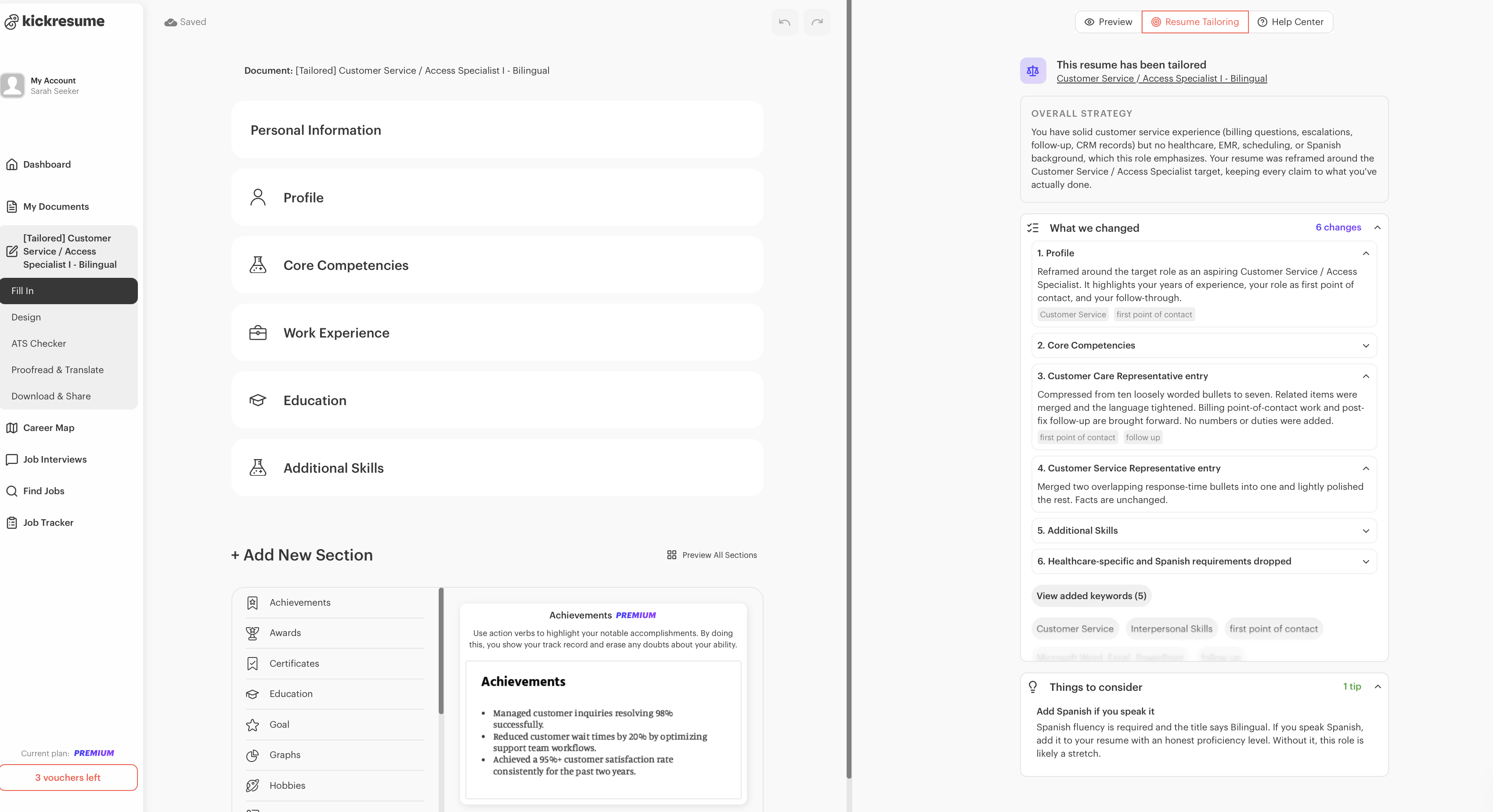
Here’s how it works: You upload your resume (or pick one you’ve already built in Kickresume), paste the job post or its URL, and choose how far you want the AI to go. Kickresume then analyzes the job description, compares it to your resume, and rewrites your resume to match. And since it only works with what’s already on your resume, you don’t have to worry about AI inventing skills or experience you don’t have.
The whole process takes about 2 minutes. You get back a tailored copy of your resume that’s already formatted in your design and ready to download, along with a full report showing every change it made and the reason behind it.
What it checks
- Keywords. Pulls the important keywords from the job ad and works them into your resume. You can click any keyword to see everywhere it now appears.
- Skills match. Compares your skills with what the role asks for and flags what you’re genuinely missing.
- Every resume section. Tailors your summary, work experience, education, and skills, not just one part of your resume.
- Your career context. Reads your resume before tailoring it, so a student and a senior manager (or a career-changer and someone going for a promotion) get tailored differently.
- ATS compatibility. Comes with a built-in ATS Resume Checker, so you can check your tailored resume without leaving the tool.
Pros
- You choose the tailoring level. You can pick Conservative for a light keyword swap, Balanced for a middle ground, or Turbo for a resume rebuilt around the job ad. Most tools decide this for you.
- Full transparency. The “What we changed” panel shows every edit and the reason behind it, so you can stand behind every line in your interview.
- The big picture first. Before listing individual changes, the report opens with an “Overall strategy” summary. It explains how your resume was reframed for the role and where your real gaps are, so you understand the “why” before you check the details.
- Honest “Things to consider.” The report flags lines to double-check, points better suited for your cover letter, and things it held back from adding because it couldn’t be sure they were true for you.
- Works with a job link. You just paste the job post’s URL, and Kickresume pulls in the job description for you. Most of the tools we tried make you copy and paste the job description or install a browser extension.
- Most affordable premium. At $8/month on the yearly plan, it’s the cheapest premium option on this list.
Cons
- Only one free tailoring. Free users can try the tool once. To tailor your resume for more jobs, you’ll need Premium.
- Turbo needs a careful read. The boldest setting can change your resume quite a lot, so review it before you hit send.
- It can’t fill real gaps. Since it won’t invent experience, a thin resume stays thin. You’ll get a list of missing skills instead of fake ones.
Kickresume’s pricing
- Free. You get one free tailoring to try it out when you sign up. Building your resume is free too.
- Premium. Premium unlocks unlimited tailoring and all of Kickresume’s AI tools. You can pay monthly ($24/month),quarterly($18/month), or yearly ($8/month).
Don’t forget Kickresume is free for students and teachers for 6 months.
2. Huntr
Huntr started out as a job tracker and has since grown into a full job search platform, with an AI resume builder, cover letters, application autofill, and its own Resume Tailor.
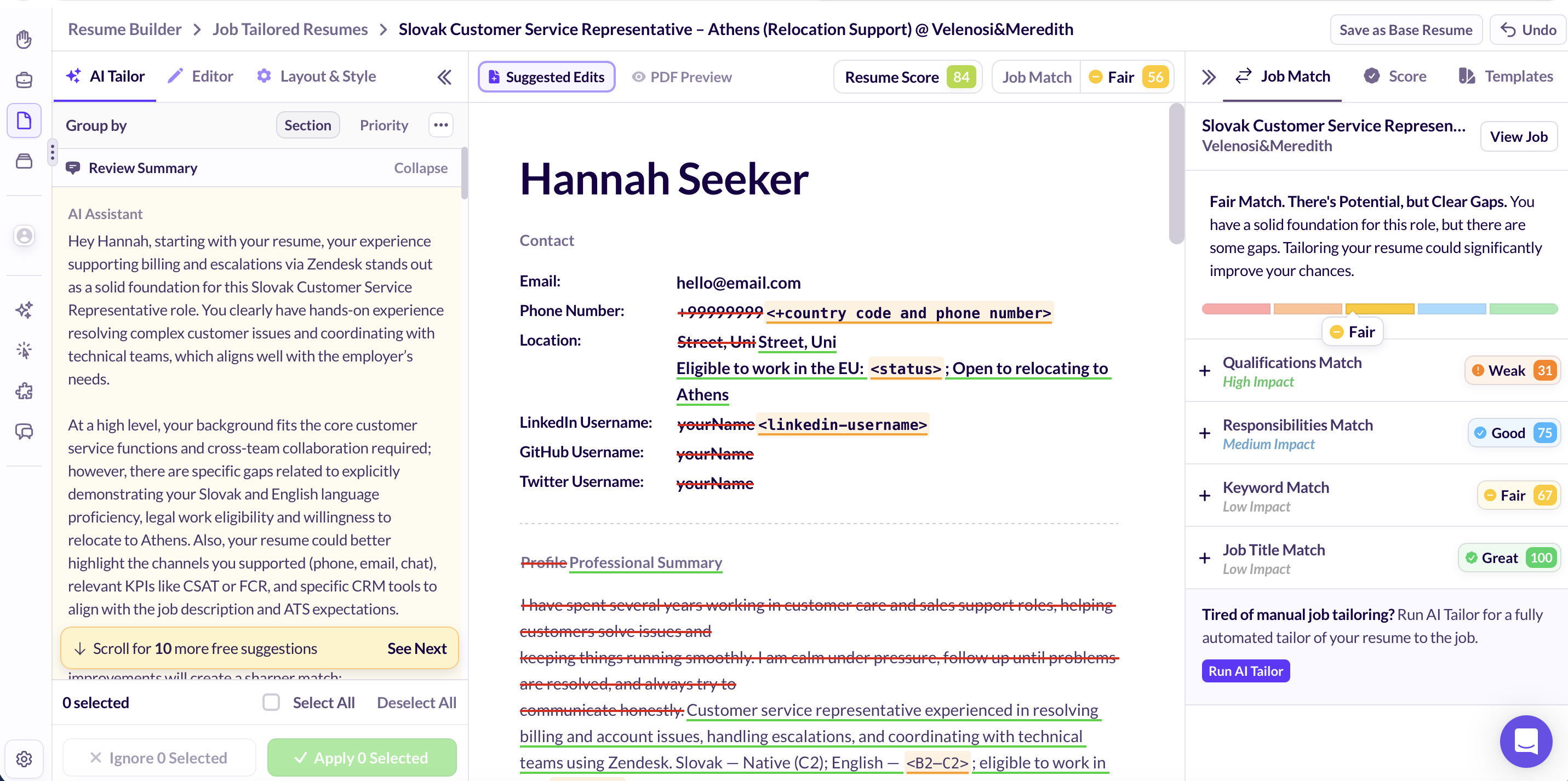
Here’s how it works: You paste in a job description (or save the job with Huntr’s Chrome extension), and Huntr pulls out the keywords, skills, qualifications, and responsibilities that matter. Resume Tailor then rewrites your summary, bullet points, and skills to match, and every change comes with a short note explaining why it was made.
What’s different about Huntr is that it doesn’t stop at keywords. It also checks how well your resume covers the responsibilities and qualifications listed in the job ad.
What it checks
- Keyword match. Pulls job-specific skills and keywords from the posting and adds them to your resume in a single click.
- Responsibilities match. Extracts the responsibilities from the job description and checks how well your resume covers them.
- Qualifications match. Checks whether your resume clearly shows why you’re qualified for the role.
- Job title match. Checks whether your resume uses the job title from the posting.
- Job Match Score. Combines all four into one score from 0–100, with a label from Weak to Great, and shows which parts have the biggest impact on your match.
- Grammar and style. Built-in grammar, style, and inclusivity checks keep your resume typo-free and professional.
Pros
- Goes beyond keywords. Huntr also checks responsibilities and qualifications, so a high score means your experience actually fits the role, not just that you’ve added the right words.
- Explains every change. Each suggestion comes with a short note on why it makes your resume stronger for that specific job.
- You stay in control. You can accept or ignore changes one by one or all at once, and edit any suggestion directly in the resume editor.
- Application autofill. Once your resume is tailored, Huntr can autofill your application on 9 ATS platforms.
- 2 free tailored resumes. It’s the most generous free plan on this list when it comes to tailoring.
Cons
- Pro isn’t cheap. It costs $40/month if you pay monthly, and there’s no free trial of Pro.
- Limited design options. You only get 7 resume templates to choose from.
- No tailoring levels. Unlike Kickresume, you can’t choose how far the AI goes. There’s no light-touch vs. full-rewrite setting.
Huntr’s pricing
- Free. 2 tailored resumes, basic job matching and scoring, free PDF and DOCX export, and tracking for up to 100 jobs. You also get a small number of AI credits to test the other AI features.
- Huntr Pro. You can pay $40/month on the monthly plan, $90 every 3 months on the quarterly plan ($30/month), or $160 every 6 months on the semi-annual plan (about $26.66/month). Pro unlocks unlimited tailoring, AI resume reviews, AI cover letters, advanced job matching, and unlimited job tracking.
3. Jobscan
Jobscan is probably the most recognized name in resume optimization. It started out as an ATS checker, and comparing your resume to a specific job description is still at the heart of everything it does.
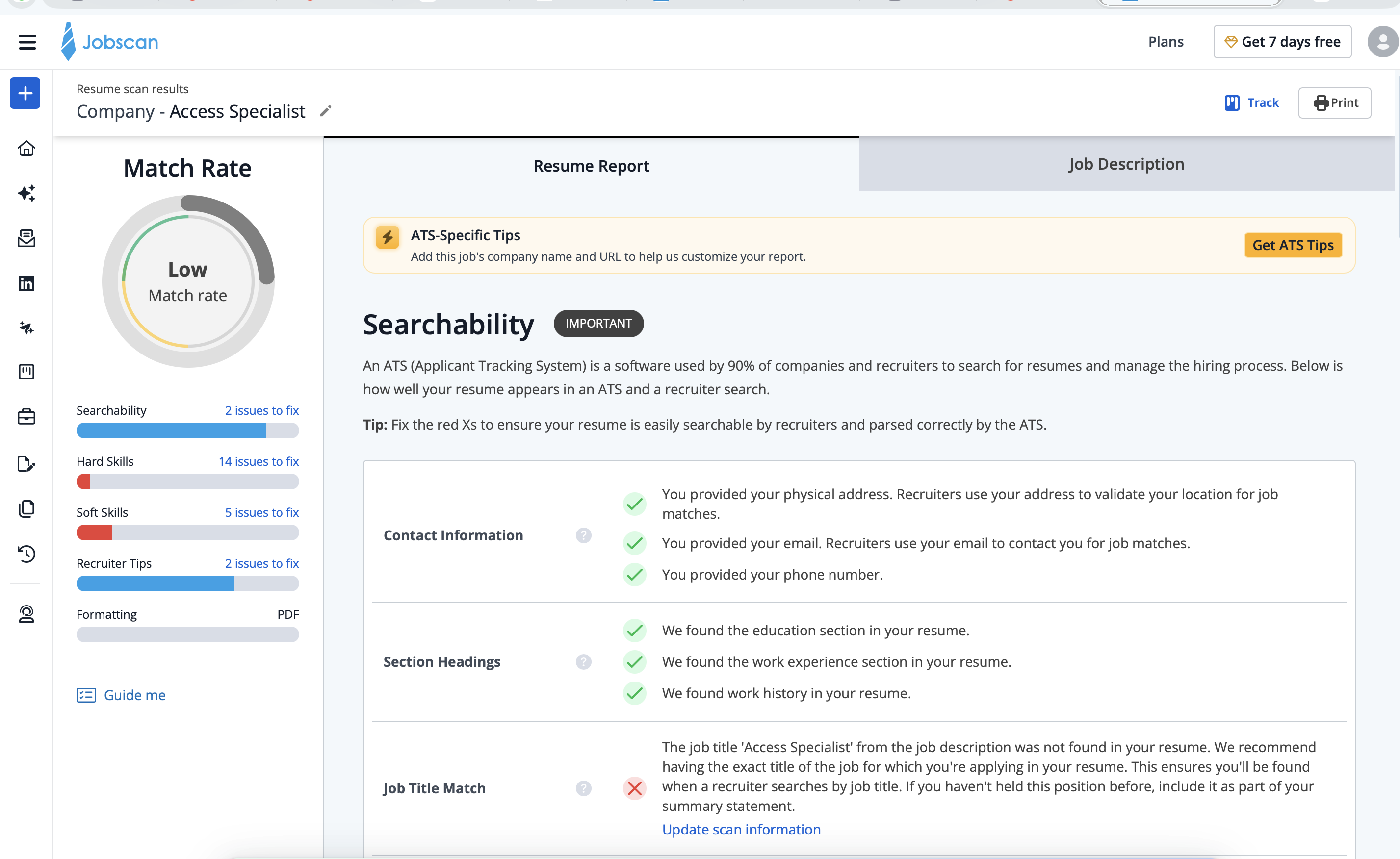
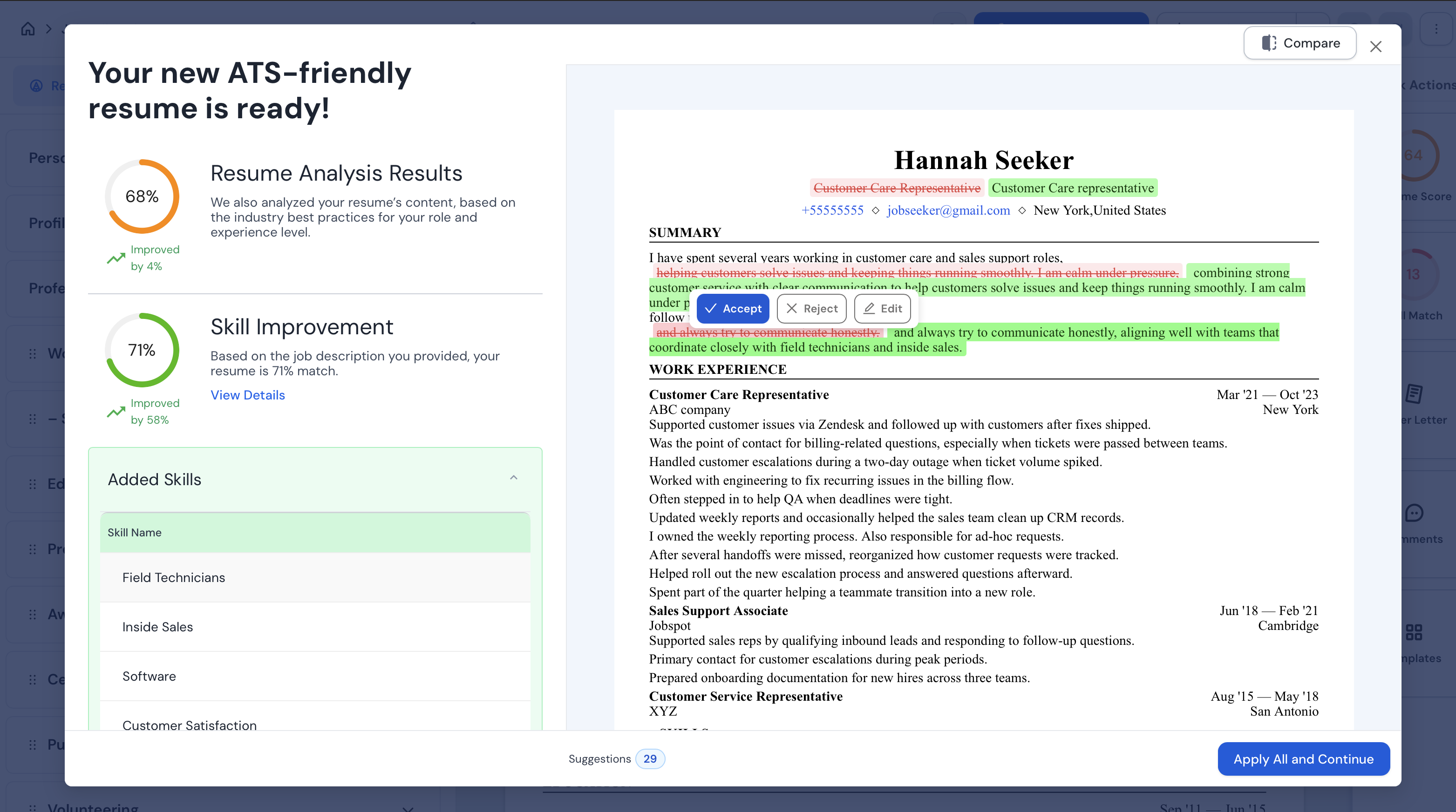
Here’s how it works: You upload your resume, paste the job description, and Jobscan runs 30+ checks to give you a Match Rate showing how well the two line up (Jobscan recommends aiming for 75% or higher). For the actual tailoring, there’s AI Optimize. It turns the gaps Jobscan found into AI suggestions that you can accept or reject one by one, or all at once.
What it checks
- Searchability. Checks whether an ATS can find your contact info, section headings, and dates, and whether you use the exact job title from the posting.
- Hard skills. Compares the hard skills and job-specific terms in the job ad to your resume, including how often each appears and which are missing.
- Soft skills. Does the same for soft skills like communication or problem-solving.
- Recruiter tips. Looks at measurable results, word count, tone and phrasing, and spelling and grammar.
- Formatting. Flags things an ATS may struggle to read, like tables, columns, images, and contact details placed in headers or footers.
Pros
- Very detailed analysis.
- Compare mode. Shows all your changes side by side, along with your starting and new Match Rate.
- It detects the employer’s ATS. If you add the company name or job link, Jobscan can often tell which ATS the company uses (like Greenhouse, Taleo, or Workday) and give you formatting tips for that specific system.
- Free scans every month. The free plan includes 5 scans per month, and it doesn’t expire.
- Bullet points built around keywords. When you click a keyword from the job description, the AI writes three bullet point options that use it.
Cons
- AI tailoring is premium-only. Free users can scan and preview the AI suggestions, but to actually use AI Optimize, you’ll need to upgrade. On the free plan, you’re tailoring by hand.
- Most expensive monthly plan. At $49.95/month, it’s the priciest monthly option on this list.
- Can read like a keyword list. Chasing a higher Match Rate can make your resume sound more like a list of keywords than like you.
- AI content is not that strong.
Jobscan’s pricing
- Free. 5 resume scans per month with basic Match Rate and keyword feedback. AI Optimize isn’t included.
- Premium. You can pay $49.95/month (Monthly) or about 29.98/month withthe Quarterlyplan (89.95 billed every 3 months). There’s also a 7-day free trial. Premium unlocks unlimited scans, AI Optimize, the LinkedIn optimizer, and the AI cover letter and bullet point tools.
4. Jobright
Jobright started out as an AI job search copilot and has since added resume tailoring, application autofill, referral search, and an AI Agent that can apply to jobs for you. Compared to the other tools on this list, though, it works a little differently.
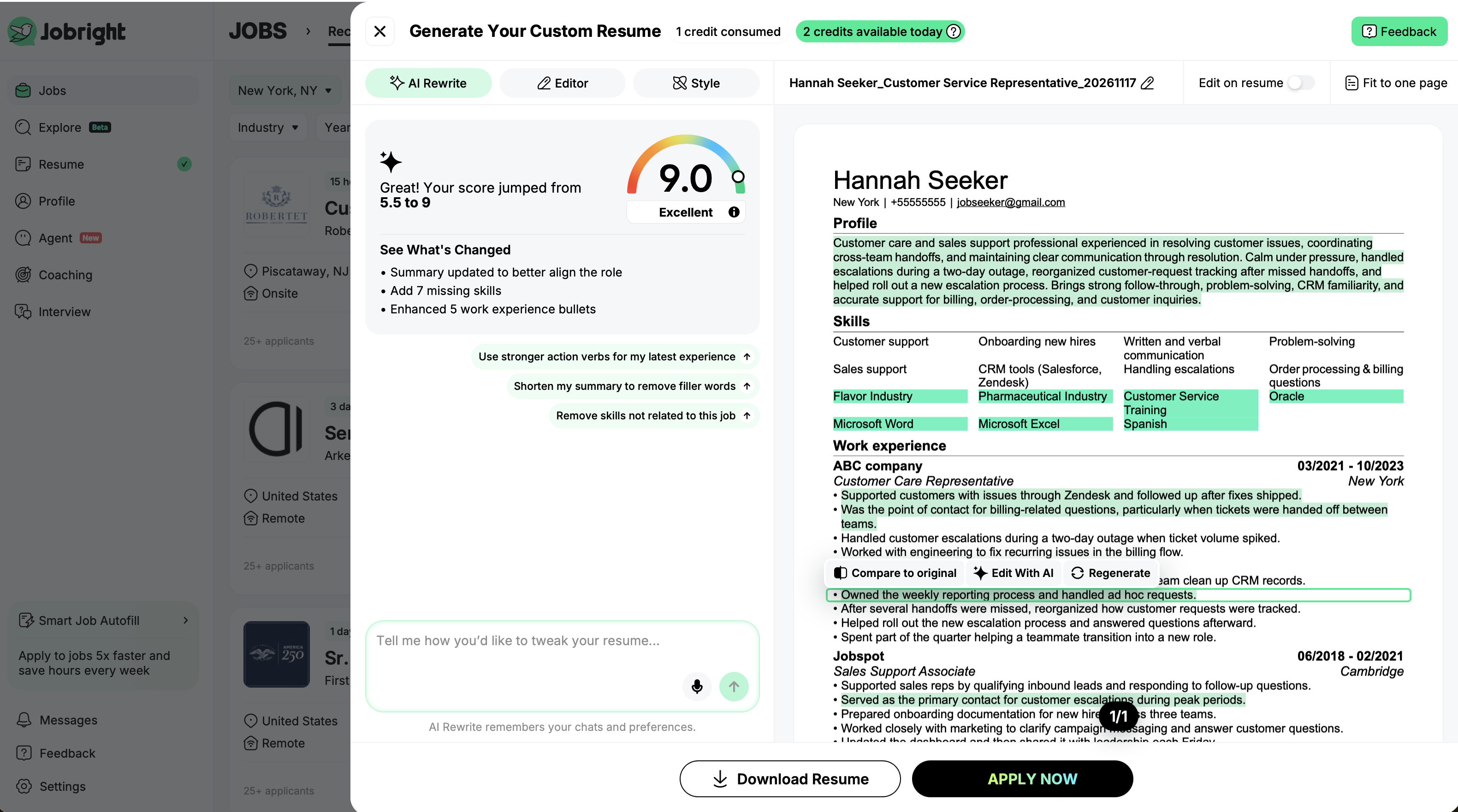
Here’s how it works: You sign in and upload your existing resume, and Jobright finds matching job posts for you, either in its own job feed or on LinkedIn and Indeed through the Chrome extension. It then compares the job’s requirements with your resume and rewrites your summary, skills, and bullet points to fit.
What it checks
- Job match. Scores every job in your feed against your resume, so you can see how well you fit before you even start tailoring.
- Skills and keywords. Compares your skills, experience, and ATS keywords with the job ad and flags potential gaps.
- Professional summary. Rewrites your summary to lead with the strengths most relevant to the role.
- Experience bullet points. Reworks your bullets to make the link between what you did and the job’s responsibilities clearer.
- ATS readiness. A separate ATS Resume Checker shows missing skills, keywords, and experience for a specific job.
Pros
- Before-and-after view. You can see exactly what each section looked like before and after tailoring, and accept or reject every change. No guessing what the AI touched.
- One-click tailoring from job pages. When you spot a job on LinkedIn or Indeed, one click on the extension gets your tailored resume ready right there.
- Your review comes first. Nothing goes out until you’ve read it, and Jobright even reminds you not to add skills you don’t actually have.
- Autofill and auto-apply. Once your resume is tailored, the extension fills in the application for you. On paid plans, an AI Agent can apply to the jobs you pick.
Cons
- Pricing is hidden. You won’t find job seeker prices on Jobright’s website. You only see them after you sign up.
- Expensive monthly plan. At $39.99/month, Turbo is one of the pricier monthly options on this list.
- No tailoring levels. Just like Huntr, Jobright decides how far the AI goes. You can’t pick a light touch or a full rewrite.
- Built for the US. Job matching and the AI Agent revolve around US job listings, so if you’re job hunting elsewhere, you’ll get a lot less out of it.
Jobright’s pricing
- Free. Job matching, basic resume tailoring, and autofill, limited by daily AI credits.
- Turbo. You can pay $17.99/week, $39.99/month, or $89.99 every 3 months (about $29.99/month). Turbo unlocks more tailoring, unlimited job matches, the AI Agent, and insider connections. Prices are shown in-app after sign-up and may vary.
5. Careerflow
Careerflow is an AI career platform that combines a resume builder, a job tracker, a LinkedIn optimizer, a Chrome extension, cover letters, and mock interviews. Much like Kickresume, it’s an all-in-one platform that keeps your whole job search in one place.
Here’s how it works: You open a job post, click the Careerflow extension (or pick a saved job), and choose your Base Resume. Careerflow reads the job description, gives you a Skill Match score, and lists the skills you’re missing. You pick which ones to add, and Careerflow turns your choices into a tailored, ATS-friendly copy, leaving your Base Resume untouched.
What it checks
- Skill Match score. Shows how well the skills and keywords on your resume match the job posting. A low score means important keywords or experience are missing.
- Missing skills. Lists the skills from the job ad that your resume doesn’t mention yet.
- Resume score. Rates your resume on keyword usage, structure, and measurable results.
- ATS-friendly version. Generates a tailored, ATS-friendly version of your resume based on the selected job.
Pros
- Your original stays safe. Every tailored resume is a separate copy, so you can tailor for dozens of jobs without touching your Base Resume.
- You decide what goes in. Careerflow suggests the changes, but nothing lands on your resume unless you approve it, so there’s no risk of AI slipping in skills you don’t have.
- Built into your job search. You can tailor straight from a job post with the Chrome extension, and each tailored resume is linked to the job in your tracker, so you always know which version you sent where.
- Job tracker and autofill. You can save jobs, track your applications, and autofill forms from the same extension.
Cons
- Setup takes time. Tailoring only works with a Base Resume built in Careerflow’s builder. Careerflow’s help center notes that an imported resume file is used for skill matching, not tailoring.
- Limited free plan. Free users can create only their first Base Resume, which limits how far you can go without upgrading.
- Little explanation. Careerflow doesn’t tell you why a skill matters for the role or why a change makes your resume stronger, so you’re left to judge that yourself.
- Needs a careful read. Careerflow doesn’t always parse your resume correctly, so check the tailored version line by line before you send it.
Careerflow’s pricing
- Free. Chrome extension, job tracking, your first Base Resume, a basic LinkedIn optimizer, and a limited skill gap analyzer.
- Premium. You can pay $8.99/week, $23.99/month, $54.99 every 3 months (about $18.33/month), or $172.99 per year (about $14.41/month). Premium unlocks unlimited resumes and tailoring, unlimited resume analysis, and the full set of AI tools.
See all 5 tools in action
That’s all five tools covered. If you’d rather see how they handle a real resume, our video puts each one to the test, side by side.
Key takeaways: Top 5 resume tailoring tools
Tailoring your resume to each job is one of the easiest ways to get past the ATS and catch a recruiter’s eye. The five tools here all help, but in different ways: Kickresume, Huntr, and Jobright rewrite your resume for you, Careerflow suggests changes for you to approve, and Jobscan’s free plan mostly shows you what’s missing.
Free plans are limited across the board, so check what you get before you commit. Huntr gives you 2 free tailored resumes, and Kickresume lets you try its full tailoring once.
The right pick depends on what you need: Kickresume for building, tailoring, and ATS checks in one place, Huntr for explained changes and autofill, Jobscan for in-depth ATS analysis, Jobright for US job matching, and Careerflow if you want to approve every change yourself.
Tailoring your resume is just one step in landing your dream job. If you want to take it even further, check out our other hands-on roundups:
- 6 Best ATS Resume Checkers: make sure your tailored resume passes the scan.
- 10 Best Resume Builders: we tested them all so you don’t have to.
- 7 Best AI Resume Writers: let AI do the first draft.
- 10 Best AI Cover Letter Generators: finish your application in minutes.
- 5 Best AI Auto-Apply Tools for Jobs: apply to more jobs, faster.
Prefer to do it by hand? Read our guide on how to tailor your resume to a specific job description.

