
 ChatGPT
 Perplexity AI
 Claude
More people than ever are job hunting across borders, whether that's chasing a role abroad, going full digital nomad, or just trying their luck somewhere new. And to pull it off, you often need to translate your resume into another language, and do it well.
Here's the thing. Clumsy translations and made-up words can sink you before a recruiter even reads your resume. The good news is that, like with most things these days, there's no shortage of AI tools promising to help.
But they don't all work the same way. Some keep your layout and formatting intact, while others leave you with a mess to clean up. We tried them and curated a list of the best online resume
Why translate your resume (and why it's tricky)
Maybe you're relocating, applying for a remote role abroad, going after a multinational employer, or heading off for a study program. Whatever the reason, the goal is the same: getting your resume into another language properly. And that's harder than it sounds.
The first problem is quality. When AI translates your resume, the wording can come out clunky or too literal, so job titles and industry terms don't always land the way they should.
The second is formatting. Translating your resume can mess up its layout, and once the formatting breaks, an ATS may not be able to read it properly, which can quietly cost you the interview.
And then there are special characters. Many languages use accents, letters, or scripts that some tools don't handle well, so you can end up with broken symbols or garbled words.
So what should a good translation tool actually do? It should:
- Preserve your layout
- Keep your resume ATS-readable
- Render special characters correctly
- Get the grammar right
With that checklist in mind, we put the most common translation tools to the test, from full resume builders to the AI everyone already uses. Here's our curated top 5.
TL;DR: Best Translation tools overview
1. Kickresume
Disclaimer: You've probably noticed that Kickresume is sitting at the top of this list, and yes, you're reading this on kickresume.com, so there might be a bit of bias. We genuinely believe in our product and work hard to make it the best resume builder out there.
That being said, let's take a closer look.
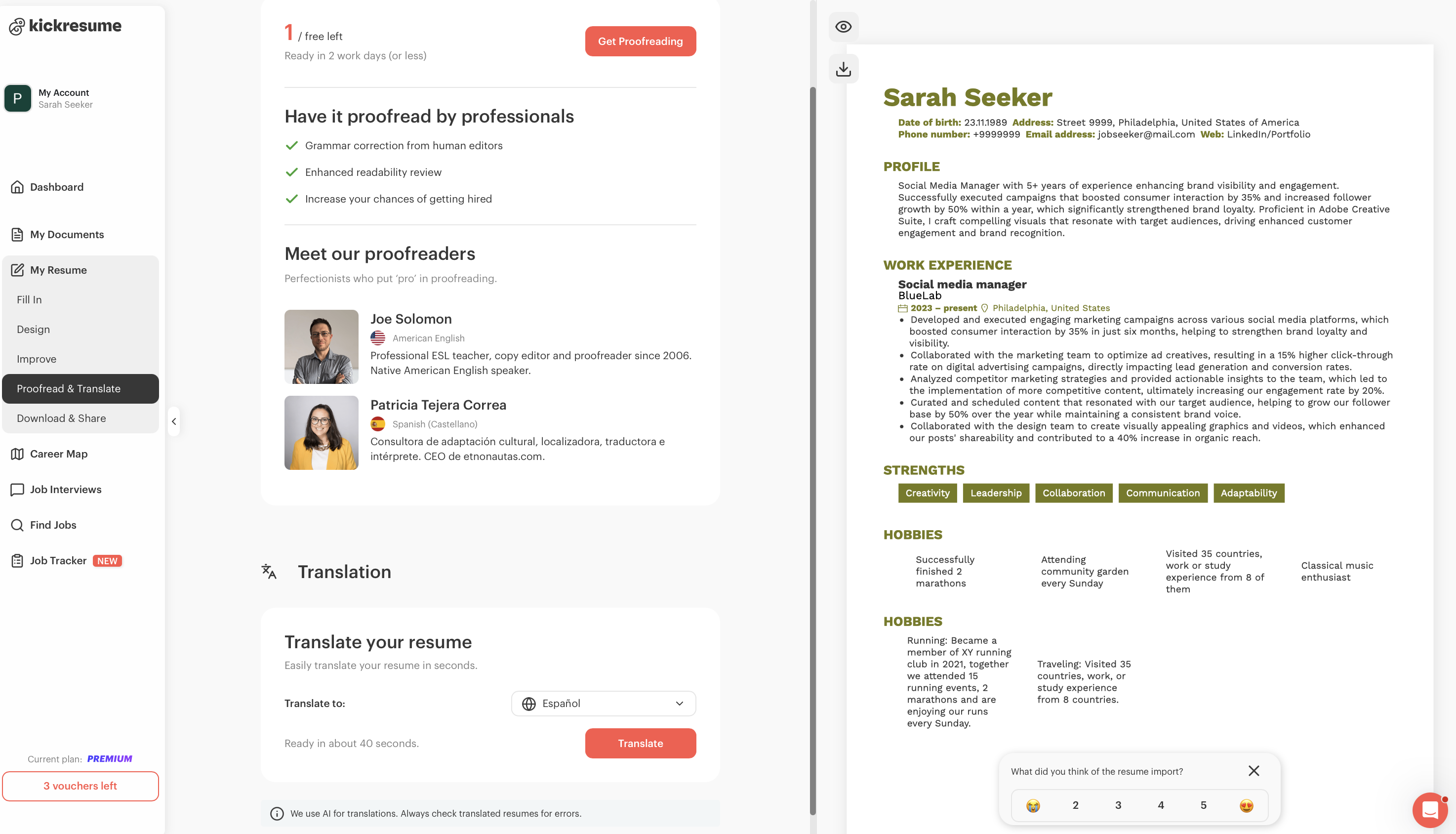
Kickresume's Resume Translation lets you translate your resume into another language without ever leaving the editor. No uploading your CV to a random third-party site, no copy-pasting into a separate translator, and no losing your formatting in the process. You build (or import) your resume, pick your languages, and translate it in one place.
It currently translates between 25 languages, covering most of Europe plus Turkish, Azerbaijani, Indonesian, and Vietnamese.
The Kickresume app itself is localized in 6 languages, but that doesn't limit what you can translate into. Your formatting stays intact. Only the content gets translated, so your layout, design, and structure look exactly as they did before.
Pros:
- Your formatting stays intact. Only the content gets translated, so your layout, design, and structure look exactly as they did before. No reformatting headaches.
- It's a custom AI translation engine tuned specifically for resumes. That means smarter phrasing and wording that actually sounds natural and professional, instead of the literal, clunky output you often get from generic translators or LLMs.
- It's fully integrated. Build, translate, and edit all in the same place. And once your resume is translated, you can tweak the content manually right in the editor if anything needs a human touch.
- You can keep multiple language versions. All your documents live in the "My Documents" section, so you can have the same resume in several languages, ready to send wherever you're applying.
- Your data stays private. No third-party uploads and no sketchy sites, your resume data is encrypted and kept secure.
Cons:
- Fewer languages than the big translators. Coverage is strongest across European languages, while DeepL and general LLMs reach further.
- The full toolset sits behind premium. Advanced templates and AI tools require an upgrade.
- A review is still recommended. The translation is accurate, but it's still AI, so you'll want to proofread before sending. You can even use Kickresume's proofreading service, available in English and Spanish (which makes this more of a pro than a con).
Kickresume pricing
- Free. Once you create a free account, you can translate your resume at no extra cost.
- Premium. For full access to all premium templates and advanced AI tools, you can upgrade to a paid plan anytime.
2. Enhancv
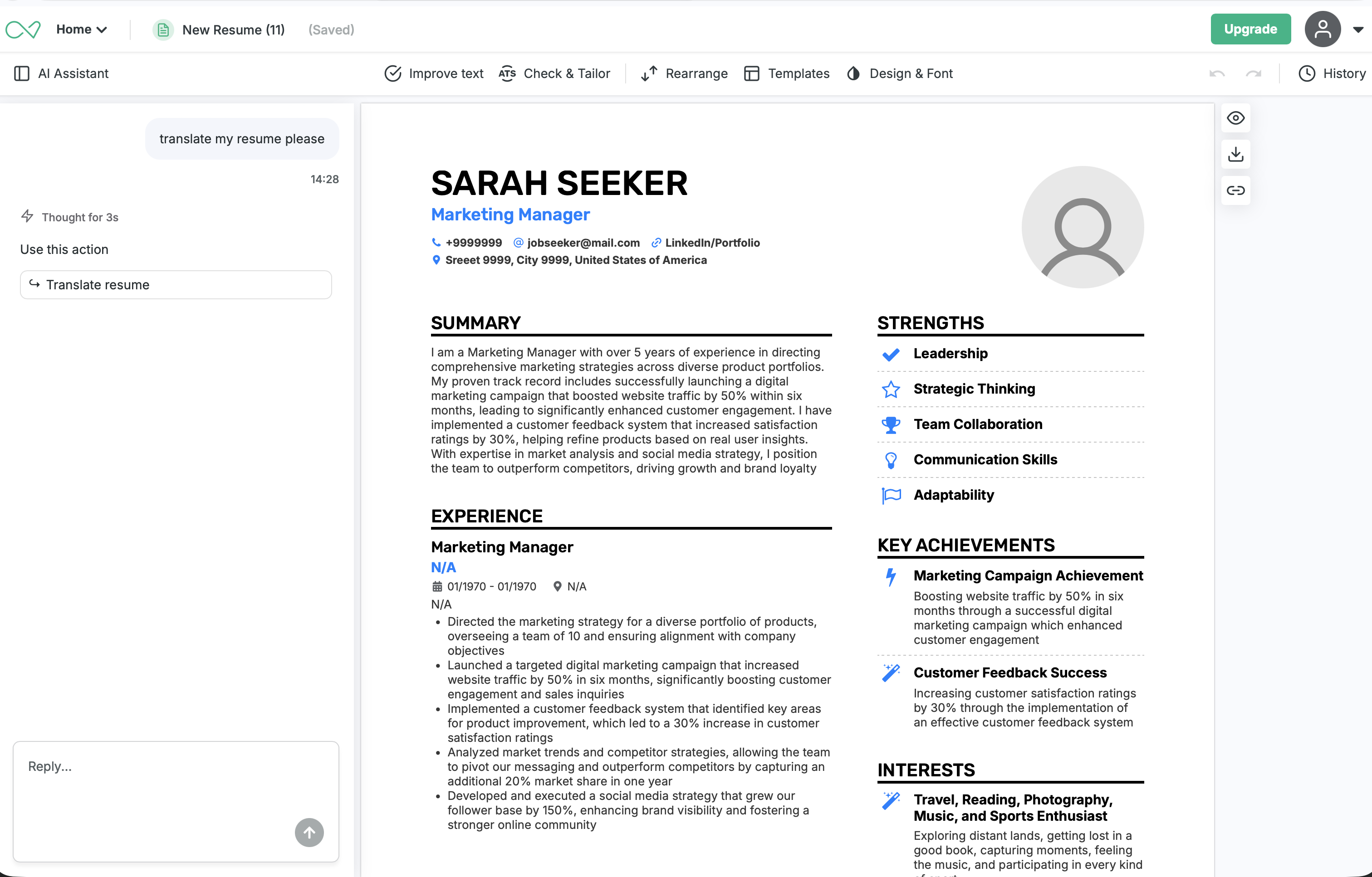
Enhancv is the closest competitor to Kickresume on this feature. What stood out in testing is how easy it is to find: when you open your resume, there's an AI assistant built into the editor, and you can simply type something like "please translate my resume."
It surfaces a translate button right there, so you're not hunting through menus for the feature. The translation itself was good, and your formatting stays intact, so there's no reformatting afterward.
It covers nine core languages, with its wider AI suite reaching 30+, and since it's a full builder, you can write, translate, and polish all in one place.
Pros:
- The AI assistant makes it effortless. Just tell it to translate your resume and it hands you the button, no searching required.
- Solid translation quality. The output read naturally in our testing.
- Formatting stays intact. Only the content changes, so your layout is left alone.
- It's a full builder. You can write, translate, and polish in one place, across nine core languages (30+ in the wider AI suite).
Cons:
- Downloads lock after the trial. The 7-day free trial gives full access, but you can't download without upgrading.
- It's on the pricier side. The monthly plan sits at the higher end of this list.
- Some features are premium-only. A few capabilities are gated behind a paid plan.
Enhancv pricing
- Free 7-Day Full Access Trial (after that ends, you can no longer edit your documents and you'll be prompted to upgrade to premium)
- For premium, you can choose to pay $29 (billed monthly), Quarterly Pro plan for $19.67 per month (pay $59 every 3 months), or Semi-annual Pro plan for $16.50 per month (pay$99 every 6 months)
3. Resumly
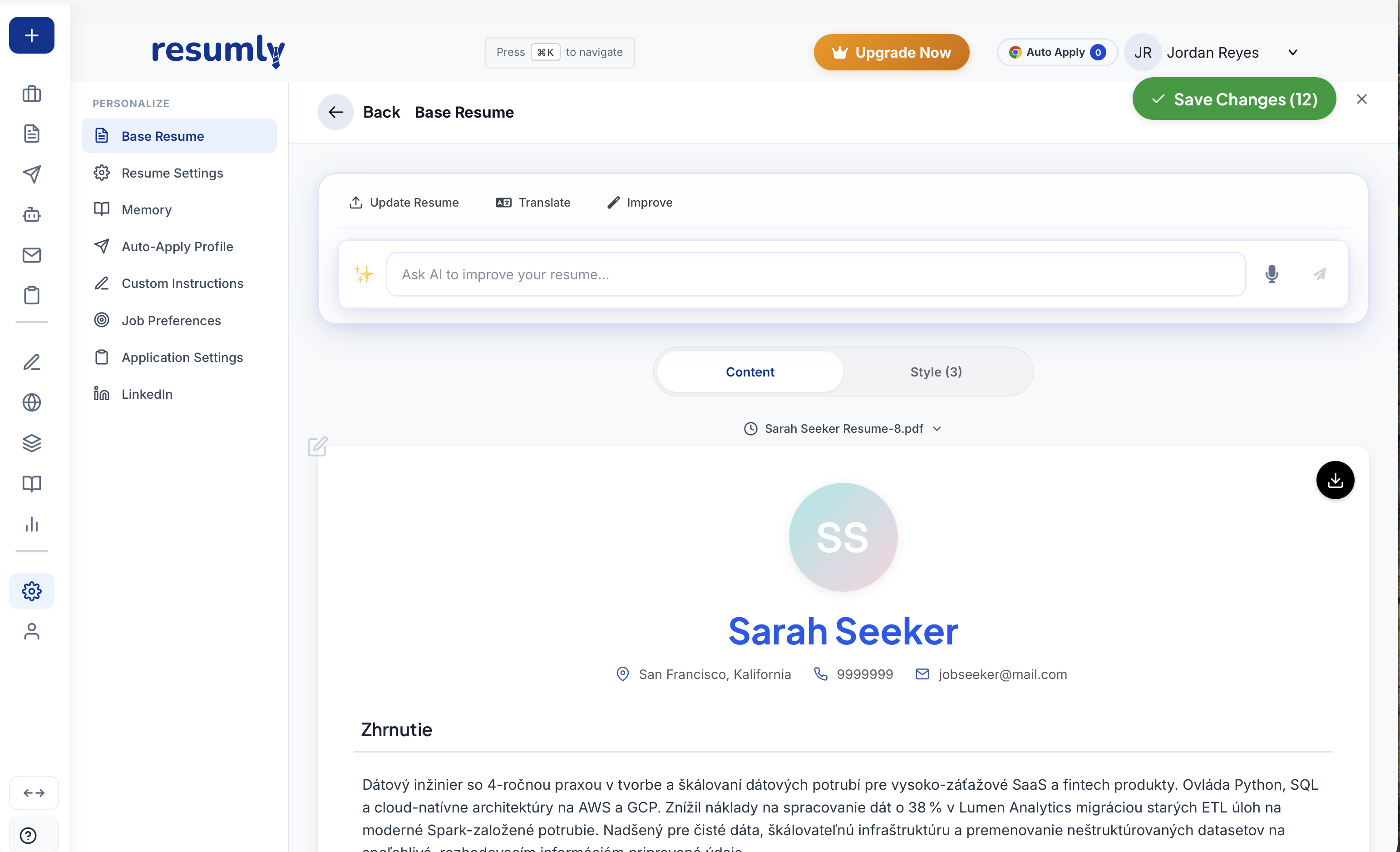
Resumly is an AI-powered job search and automation platform where you can also transform or parse your resume.
Its main draw is range: it translates into 40+ languages, including right-to-left scripts, which is more than anything else on this list, and the editor is clean and easy to find your way around.
It's GPT-4 powered too, but while the tool and language range is impressive, it's worth testing the output before you rely on it, since quality can vary from one language to the next.
Pros:
- The widest language range here. 40+ languages, including right-to-left scripts.
- Intuitive and easy to use. The editor is straightforward, with almost no learning curve.
- A free-forever plan. You can start without a credit card.
Cons:
- Translation quality was hit or miss. We tested a couple of languages and the results weren't as polished as we'd hoped, so you'll want to review them carefully.
- Breadth over depth. A big language count doesn't guarantee the resume-specific quality you get from a more focused tool.
- No Trustpilot presence yet. There's little outside data to back up the quality.
Resumly pricing
- Free. No credit card required, with limited daily applications and AI credits.
- Paid plans, there are three tiers billed monthly: Starter at $15/month, Accelerator at $30/month, and Max at $50/month.
4. DeepL
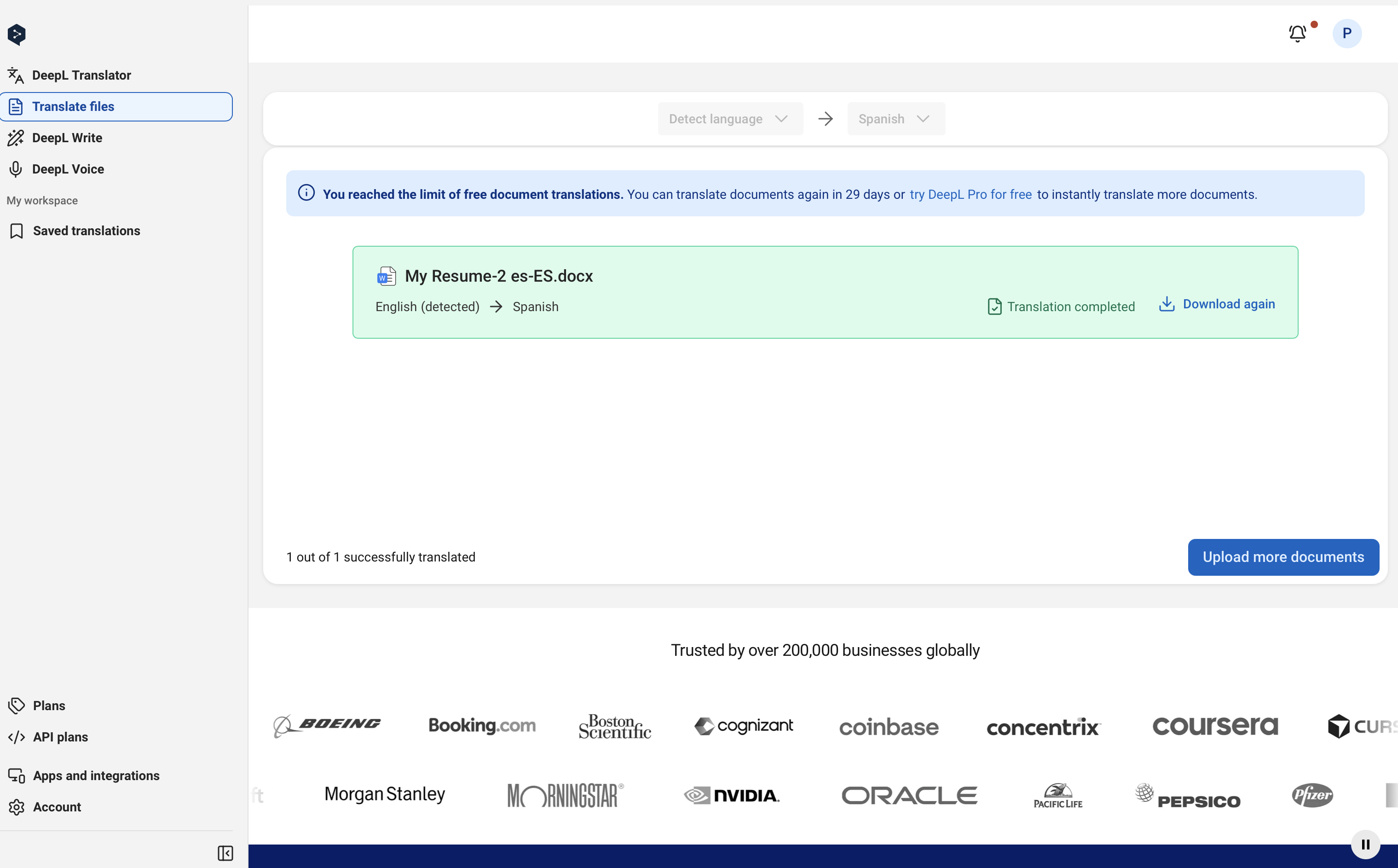
DeepL isn't a resume builder, but no translation roundup is complete without it. It's one of the most widely used translation tools out there, and many people consider it the best in the business for raw translation quality.
The output is consistently natural and accurate, and you can translate into a huge range of languages, far more than any resume builder on this list.
That's a real advantage if you need a less common language, or one with special characters and accents that the builders either don't support or don't handle cleanly.
The trade-off is that DeepL only does the translation. Everything else is on you.
Pros:
- Best-in-class translation quality. It's widely regarded as the gold standard, especially for European languages.
- A huge choice of languages. Far more options than any resume builder here, which is great if your language is uncommon or uses special characters.
- Free to use. The free tier covers most resume-length needs, with Pro plans available if you want more.
Cons:
- It's not a resume builder. There's no editing and no preview, so you can't see how your resume actually looks as you go.
- It's a lot of manual juggling. You copy text out of your resume, translate it in DeepL, then paste it back and reformat everything by hand, swapping between apps and tools the whole time.
- No resume-specific tuning. It translates the language, not the resume conventions, so it won't handle ATS-friendliness or formatting the way a dedicated builder does.
Deepl’s pricing
- Free. Translates up to 50,000 characters per month and one document at a time, which is more than enough for a resume.
- Premium. Pro plans start at around $8.99/month (billed annually) for higher limits and more document translations, scaling up to larger Team and Business tiers.
5. ChatGPT
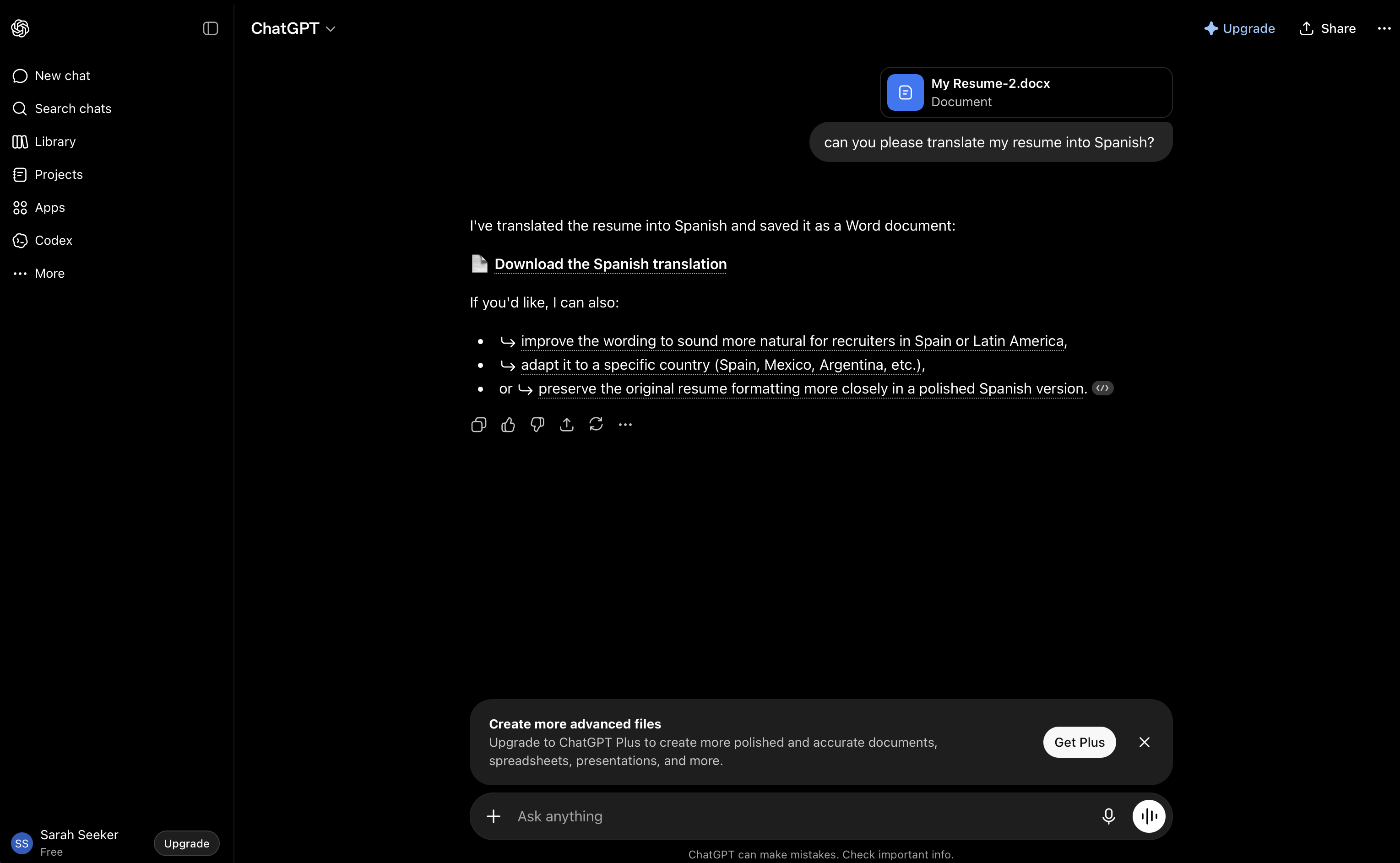
Let's address the obvious one, since it's where a lot of people start. Yes, you can translate your resume with ChatGPT for free, and it does it well.
In fact, it (and models like it) quietly power a lot of the tools on this list. Paste in your resume, ask for your target language, and you'll get natural-sounding results in seconds.
The catch is everything around the translation. ChatGPT only handles raw text, so it doesn't touch your layout, and a general chatbot isn't tuned for resumes, so the output can come out clunky.
If you can't speak the target language and can't sanity-check the result yourself, an AI built specifically for resume translation is the safer bet.
Pros:
- Free and fast. A full translation takes seconds, with no subscription needed.
- A huge language range. It handles far more languages than any single builder here.
- Natural-sounding output. It's the same underlying tech that powers many paid tools.
Cons:
- No formatting or layout. You're left copy-pasting and reformatting your resume yourself.
- No resume-specific tuning. A general model can produce clunky phrasing unless you prompt it carefully.
- No single workspace. You can't see your resume update as you edit, the way you can in a builder.
ChatGPT pricing
- Free. Free version which is enough to translate a resume, though it comes with message limits.
- Premium. Go is $8/month and Plus is $20/month. Keep in mind you're paying for the whole LLM and everything it can do, which is a lot just for translating a resume, but well worth it if you'll use it for other things too.
Key takeaways
Translating your resume has never been easier, but the tool you pick still matters. Dedicated tools like DeepL and ChatGPT translate well and are often free, but they leave you to rebuild the formatting yourself.
Builder-integrated tools translate the words and keep your layout and ATS-readability intact, all in one place, which is why our top picks are builders.
For the least hassle, go with one that translates inside the editor (like Kickresume); for an unusual language, DeepL is hard to beat. Either way, proofread before you send.
Want to go further? Pair your translated resume with our best ATS resume checkers and best AI resume writers.
Find out your resume score!


![How to Write a Professional Resume Summary? [+Examples]](https://d2xe0iugdha6pz.cloudfront.net/article-small-images/How_to_Write_a_Professional_Resume_Summary_.png)

![How to Describe Your Work Experience on a Resume? [+Examples]](https://d2xe0iugdha6pz.cloudfront.net/article-small-images/How_to_Describe_Your_Work_Experience_on_a_Resume_.png)