

 ChatGPT
 Perplexity AI
 Claude
A recent survey found that 67% of employers use social media sites to research potential job candidates. Hence, knowing how to put social media on resume allows you to crack the code and be one step ahead.
Social media has become a huge part of our daily lives as well as our professional identities. That's why including social media links in your resume can, in many cases, be advantageous and even required.
And if you're working in industries like social media management, marketing, or content creation, you'll also want to know how to properly list your social media skills on your resume.
However, there's a few things to consider before doing so. Keep reading to find out how to include social media links on your resume in a way that enhances it, rather than damages it.
This guide will show you:
- What is the social media section on your resume?
- When (not) to include social media on resume?
- Why should you include your social media profiles on your resume?
- Which social media profiles you should and shouldn't mention?
- How to put social media on resume?
- Why and how to put LinkedIn on a resume?
- How to include social media skills on resume?
Try our AI Resume Writer and have your resume ready in minutes!

What is the social media section on a resume?
The social media section is the part of your resume where you link to profiles that support your application, whether that’s LinkedIn, a portfolio, or even platforms like Instagram, X, or TikTok if they’re relevant to the job.
You’ll usually place it near your contact details or towards the end of your resume, and it shouldn’t take up much space. But don’t think of it as filler. Think of it as something that can strengthen your application, especially if social media is relevant to the role you’re applying for.
And even if you don’t include any links, there’s still a good chance an employer will look you up. That’s why it helps to be intentional about what you put on your resume and what you leave off, so your online presence works for you, not against you.
When (not) to include social media on a resume?
While this section isn't necessary for everyone, it adds a nice touch to your resume. Some professions can even showcase their creative side and social media skills, which can ultimately benefit them.
So, when to include social media on resume? And when is it best to avoid?
By a rule of thumb…
- If you work in a field where social media are completely irrelevant — only include LinkedIn and nothing else. LinkedIn is pretty much a must for everyone now.
- If you're applying for a job in a smaller company or a startup where a cultural fit is important but it's in a field where social media are also kind of irrelevant — include LinkedIn, and possibly other social media platforms which show your personality in a positive light. That is, of course, only if you want. It's not necessary.
- If you work in an industry where social media are a big part of the job — include those you're proud of and that are relevant. Wondering which social media are appropriate and how to include them? Keep on reading.
- If you work in a creative industry — include the social media (or portfolios) where you show off your work. For example, a developer can share their GitHub, and a motion graphic artist can share their YouTube.
Why include social media links in your resume?
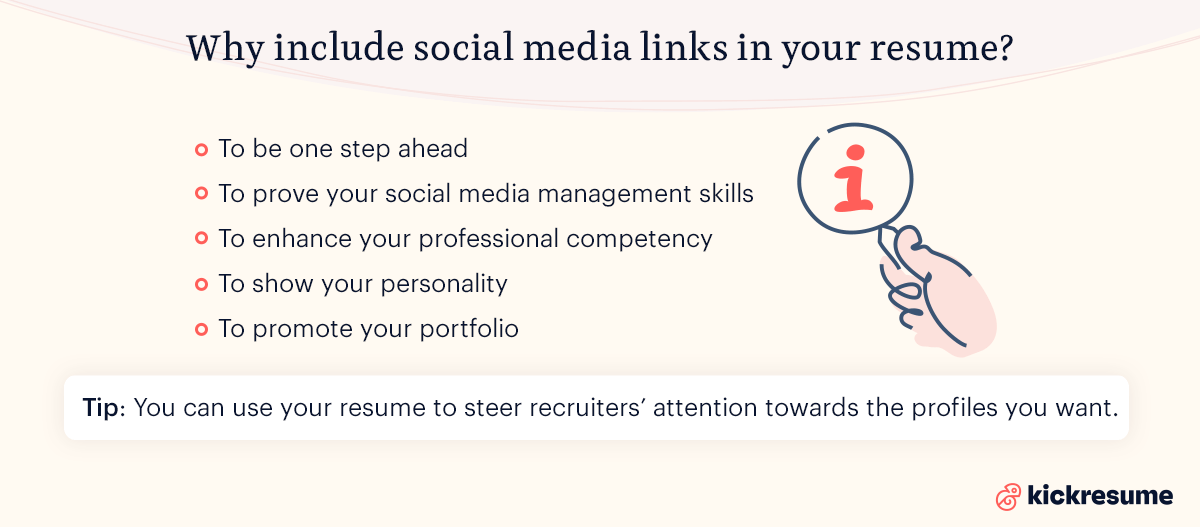
- To be one step ahead. The hiring managers will google you anyway. As you get to the last round of interviews, 67% of potential employers check your online footprint. And since your profiles are among the first things that’ll pop up, you should know how to add social media to your resume.
- To prove your social media management skills. If you’re looking for a job as a social media manager, copywriter, content creator, or any related profession, including your social media accounts is a smart way to demonstrate your skills.
- To enhance your professional competency. The purpose of your social media profile doesn’t need to be just sharing memes. You can rather post about new trends in your industry or relevant topics for your profession. In the employer's eyes, doing so enhances your level of professional expertise.
- To show your personality. It's often the case in smaller companies that even if a candidate lacks a qualification (or two), they can still become a part of the team if the employer thinks they'll fit the company culture. Your social media profiles can help them determine that.
- To promote your portfolio. Whether you're an architect, a graphic designer, or a web developer, having an online portfolio is essential. Including an interactive link in your resume is a simple and effective way to present it.
- To highlight your networking skills. For some positions, like sales or PR roles, having an extensive network and strong online presence can be a significant advantage. Including your professional social media accounts can demonstrate your ability to network and maintain professional relationships.
- To showcase your creativity and branding skills. For jobs that require creativity, such as marketing or advertising roles, your social media profiles can act as an extension of your resume, showcasing your personal brand, creativity, and ability to engage an audience.
You have full control over what hiring managers are going to see when they look you up. Hence, you can use your resume to steer attention towards the profiles you want them to see and make it your advantage.
Yet, you should keep in mind that there’s more important information on your resume such as your work experience, education or achievements. Consider adding your social media in a way that doesn't steal the attention from other, more important sections.
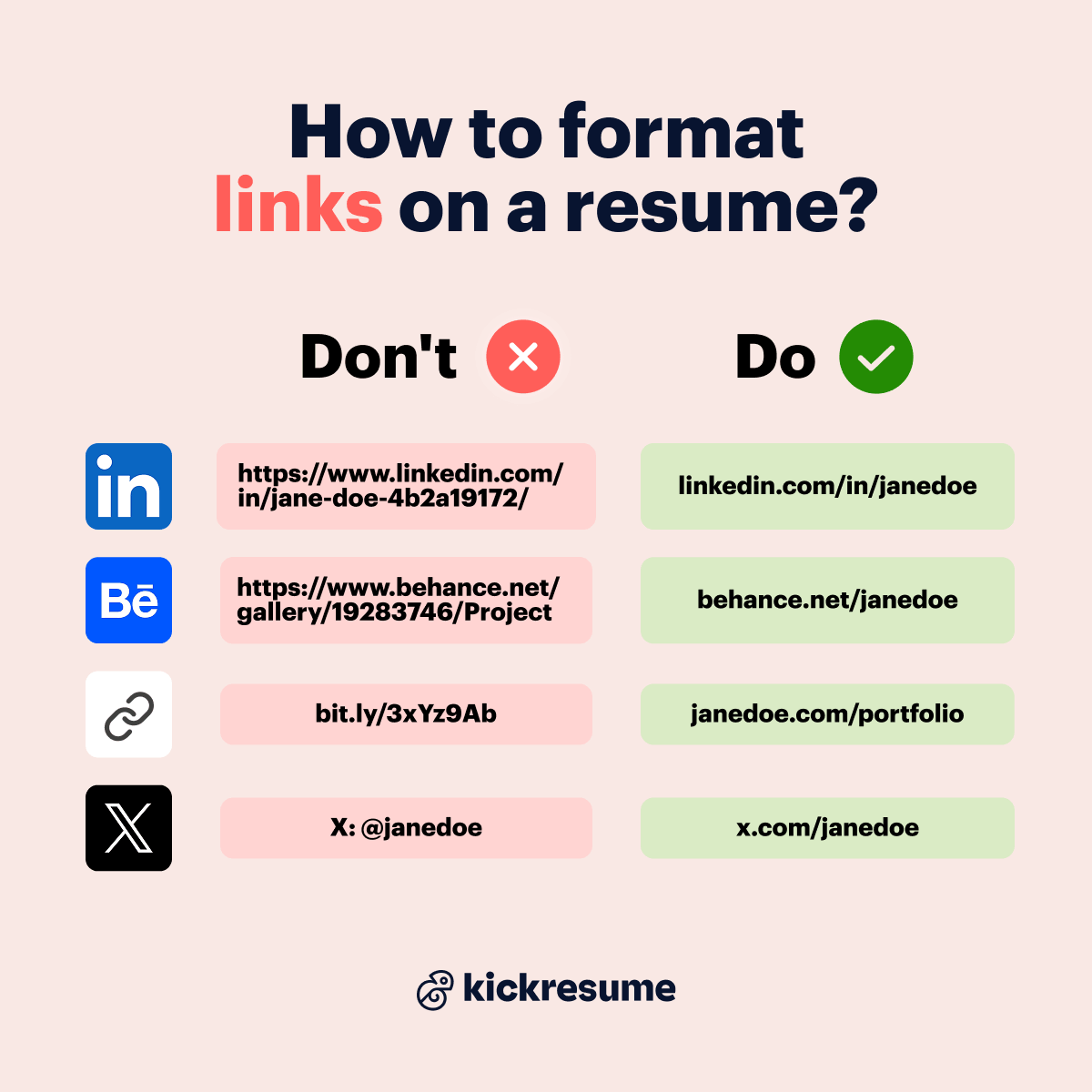
How to format links on a resume?
Links are a small detail, but they can make your resume look messy if they' re not formatted well. Here's how to keep them clean and easy to use:
- Drop the "https://" and "www." They take up space, and the link works without them.
- Personalize your URLs. Replace auto-generated strings of numbers and letters with your name wherever the platform allows it.
- Use full URLs instead of @handles. A handle alone isn't clickable, so the recruiter has to search for you manually.
- Avoid URL shorteners. Links like bit.ly hide the destination, look spammy, and can get flagged by email security filters.
- Keep the styling subtle and consistent. If you color or underline links, make sure they're still readable when printed in black and white.
Should you hyperlink text or show the full URL? Julia Belak, Certified Professional Resume Writer, comments:
It's better to show the full, readable URL and make it clickable at the same time. Hiding a link behind anchor text like "View my portfolio" has one considerable downside. Some applicant tracking systems (ATS) may fail to retain the URL behind a hyperlink, leaving only the visible text.
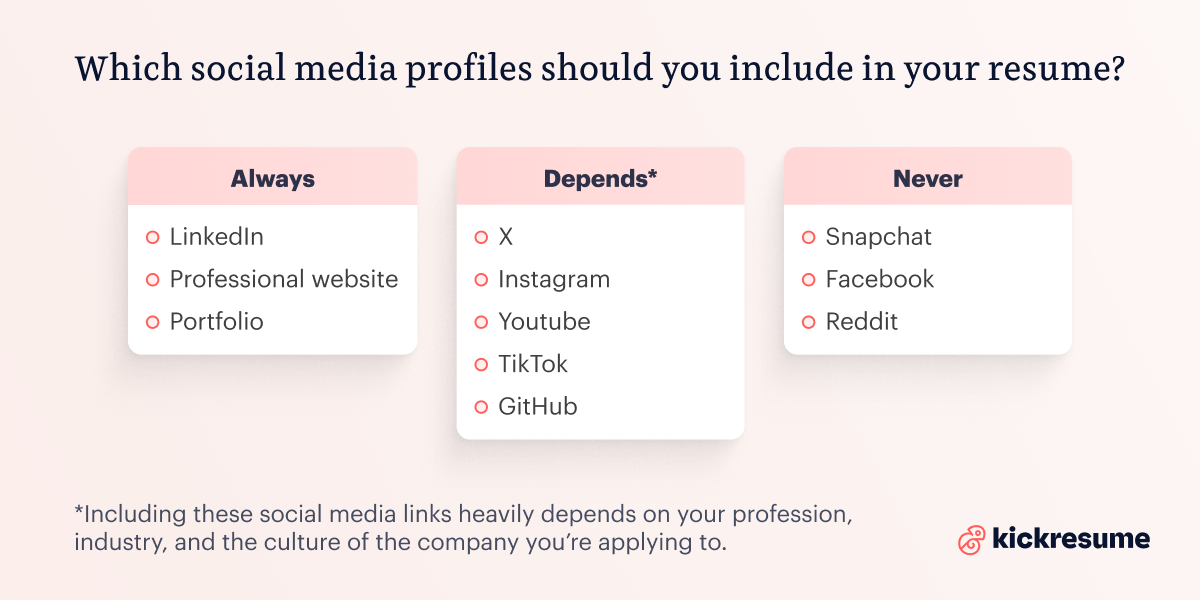
Which social media profiles should you include in your resume?
Always. These are the social media and online platforms which should always be included in your resume, no matter the profession.
- LinkedIn. No exceptions, no industries. It's the default professional network — if you don't have one, build it before you submit your resume.
- A professional website or portfolio. Behance, Dribbble, GitHub Pages, a personal domain, or a Kickresume-built site. Anything that shows your work cleanly.
- Substack or industry newsletter (if you publish one). A regularly-updated newsletter on your field is portfolio-grade proof of expertise. List it like you'd list a publication.
Depends. Including these social media links heavily depends on your profession. So, let's go over them.
- GitHub. Essential for developer, data, and engineering roles. Make sure nothing you've pushed is confidential.
- Behance / Dribbble. Usually more valuable than a personal portfolio for designers.
- X (Twitter). Worth including if you post about industry trends, research, or thought leadership. Skip if it's personal or political.
- Bluesky. Growing fast in journalism, academia, science, and parts of tech. Include if your industry has migrated and you're active there.
- Instagram. Strong for marketing, content, design, fashion, food, fitness, and photography roles. Skip otherwise.
- YouTube. Include only if your channel demonstrates professional expertise in fields like motion design, software tutorials, education, podcasting. A personal vlog won't help.
- TikTok. Worth adding if the role involves video, social, or audience-building and your content shows you can earn engagement.
- Threads / Mastodon. Usually too informal for a resume, but include if you're active in a niche where the platform matters (Mastodon for academics and devs, Threads for content creators).
Never. As radical as it sounds, these social media platforms should never be included on your resume. Please.
- Facebook. Rarely worth listing. But if you're applying for a community-management role or a Facebook-native brand, that's the exception.
- Snapchat. Built on disappearing content. Almost no professional case to include it.
- Reddit. Often anonymous and username-based, so it's hard to surface professional credibility on a resume. If you're active in industry subreddits, mention it in interviews, don't link it.
- Pinterest, BeReal, Discord. Personal-use platforms. Keep them out unless the role specifically asks (e.g. interior designer with a polished Pinterest, community manager running a Discord).
Can you really get fired for what you post on social media?
Oh yes, you absolutely can. And faster than most people realize. In the US and most other at-will employment markets, a company can terminate you for almost any post that damages their reputation, breaks a confidentiality rule, or clashes with their stated values.
Take the urgent care staff at a Sutter Health clinic in Santa Barbara. They were fired after posting Instagram videos that joked about patient conditions during shifts. Or the now-canonical case of a communications director at IAC, who posted an offensive racial joke before boarding an 11-hour flight and was already out of a job by the time she landed.
10 Questions to ask before adding social media to your resume
We’ve talked a lot about which platforms can boost your resume and when it makes sense to include them. But what if you’re not a social media manager, a brand ambassador, or a content manager or creator — just someone applying to a regular job who isn’t sure whether their LinkedIn, Instagram, or X is worth sharing?
Ask yourself these 10 questions to see if your profile is even shareable in the first place.
- Are all posts/photos at least PG-13 (no nudity, swearing, offensive jokes)?
- Do I avoid complaining about or mocking former jobs, bosses, or coworkers?
- Are there no posts showing illegal or irresponsible substance use (weed, alcohol, drugs)?
- Does my profile photo look professional or at least neutral (not a party pic)?
- Would I feel comfortable if a recruiter or future manager scrolled through 10 random posts?
- Are my job titles, dates, and career info consistent with my resume?
- Is the account active and not abandoned (updated within the last year)?
- Are there posts that highlight something positive about me (skills, interests, achievements)?
- Is my username/URL clean, professional, and easy to share?
- In my country/industry, is sharing this platform considered normal (and not frowned upon)?
If you confidently answered “yes” to all of them, it’s safe to consider adding. If not, leave it off your resume.
How do you clean up your social media before putting them on a resume?
Before you list a single social media link on your resume, audit what's already out there. Here's the routine.
- Google yourself in an incognito window: Try variations full name, name + city, name + employer, name + university and check the Images tab too (old photos surface there even when they don't appear in text results). The first 20 results are roughly what a recruiter sees in a five-minute screen.
- Audit each active account: Scroll back at least 2–3 years on every profile. Look for: party photos, political rants, complaints about former bosses, offensive jokes, controversial likes or shares. Don't forget likes and comments! Those are visible too, especially on X, Reddit, and Facebook. Delete, archive, or set to "Only me" anything that wouldn't survive a recruiter's glance.
- Untag aggressively: Old party photos, school throwbacks, anything you didn't post but are tagged in. On Facebook and Instagram you can remove the tag without removing the photo. If a photo can't be untagged, message the original poster and ask them to take it down.
- Shut down accounts you're no longer using: Old MySpace, Tumblr, LiveJournal, dormant Reddit accounts with your real name attached, high-school-era anything. JustDelete.me has direct deletion links for most major platforms.
- Audit profile photos and usernames: Profile photos should be neutral-to-professional across every public-facing account. Usernames should be reasonably consistent. This helps recruiters land on the right profile instead of guessing. Your LinkedIn photo and resume photo (if you use one) should match.
Run one more Google search a week later. If your results still pass the test, your resume's social media section is safe to publish.
How to put social media on a resume?
There are many differing opinions and views on how to list social media on a resume which is why in this section we aim to summarize and dissect them.
Here we go:
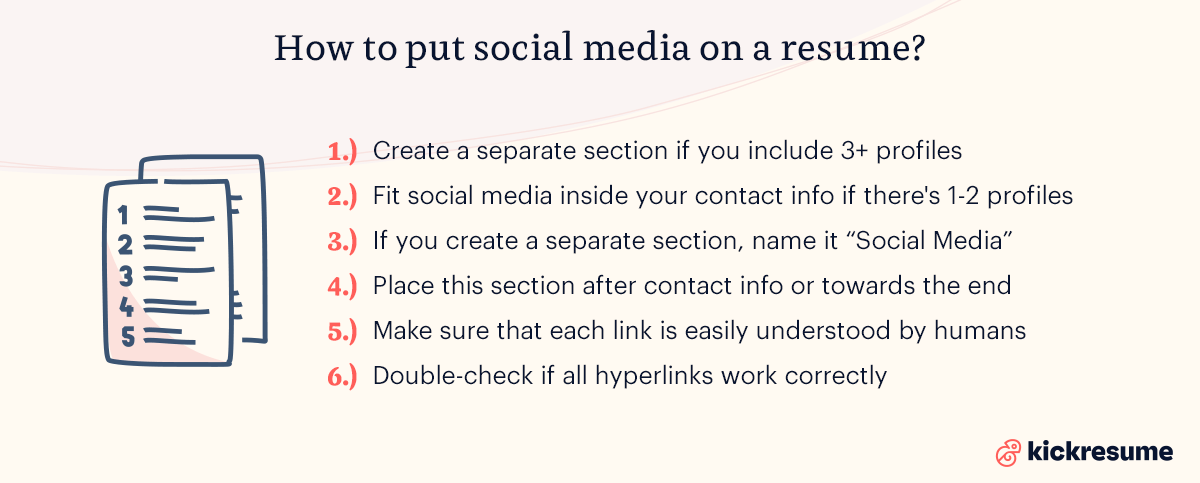
- Create a separate resume section for your social media profiles, if you're absolutely sure about the relevance of these platforms for your profession. Moreover, you should create a separate section if you want to include 3+ profiles.
- Fit the social media inside your contact information section at the top of your resume if you only want to include 1–2 profiles. If you only want to include your LinkedIn, it's also better to fit it in the contact info.
- If you create a separate section, preferably name it “Social Media”, but in some cases you can try something more catchy, like “Find me online”. We definitely don't recommend any funky headlines if you're aiming for a job in a big company or in the corporate world. Beware of ATS.
- Place this section after contact Information or towards the end of the resume, depending on the resume format you choose. Either way is good, it just depends on what you prefer. If it's really important for your profession, place it at the beginning. If it's not, it shouldn't steer attention away from more important sections and should rather be placed towards the end.
- Make sure that each link can be easily understood by humans by naming each profile in a way that helps potential employers tell which social media platform it is. Importantly: If you're only including a social media or website link to your contact info, include the short form of your personalized URL, rather than your @.
- NO: https://x.com/Kickresume
- YES: X: @Kickresume
- YES: www.linkedin.com/in/john-snow-designer
- Double-check if all hyperlinks work correctly. Though sometimes, including hyperlinks isn't necessary provided that you include your @.
- Try using Kickresume to create your resume. Our resume builder lets you add a social media section in an ATS-friendly way ensuring optimal readability and a polished look. Plus, we’ve got icons for every major social platform out there.
Check the examples below.
Social media on a resume examples
Since sometimes a picture is worth a thousand words, here are two examples of how to list social media on a resume in a neat and efficient way, utilizing all the above-mentioned tips — crafted using Kickresume.
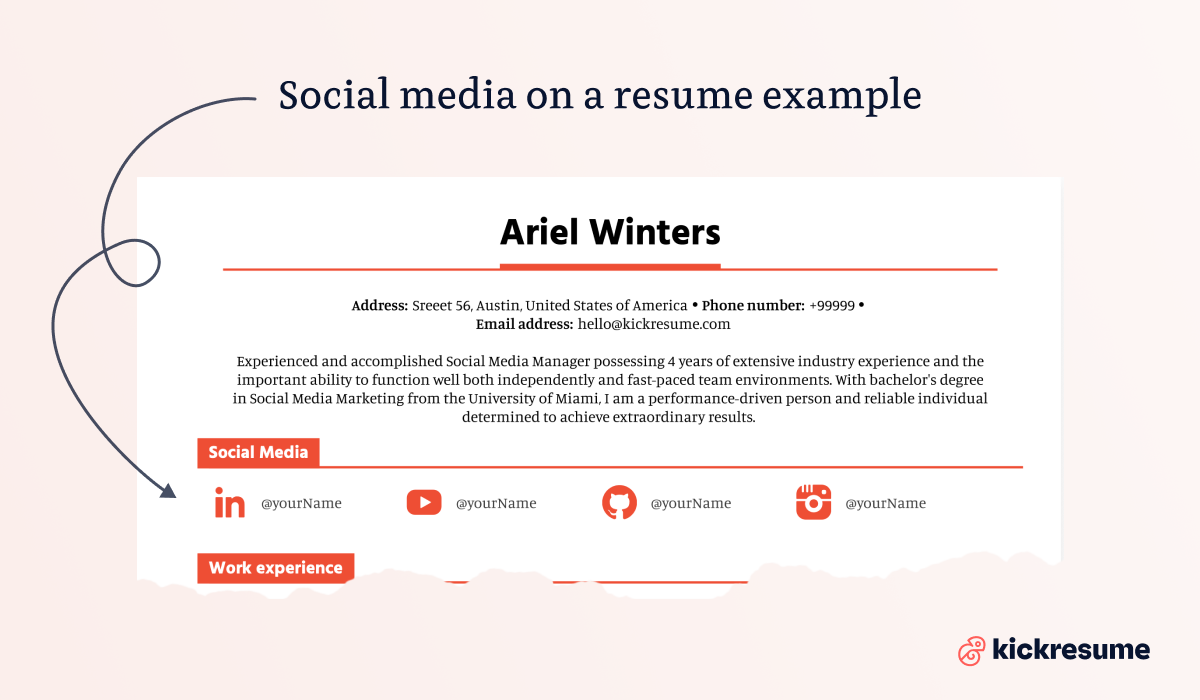
First, an example of a separate social media section on a resume.
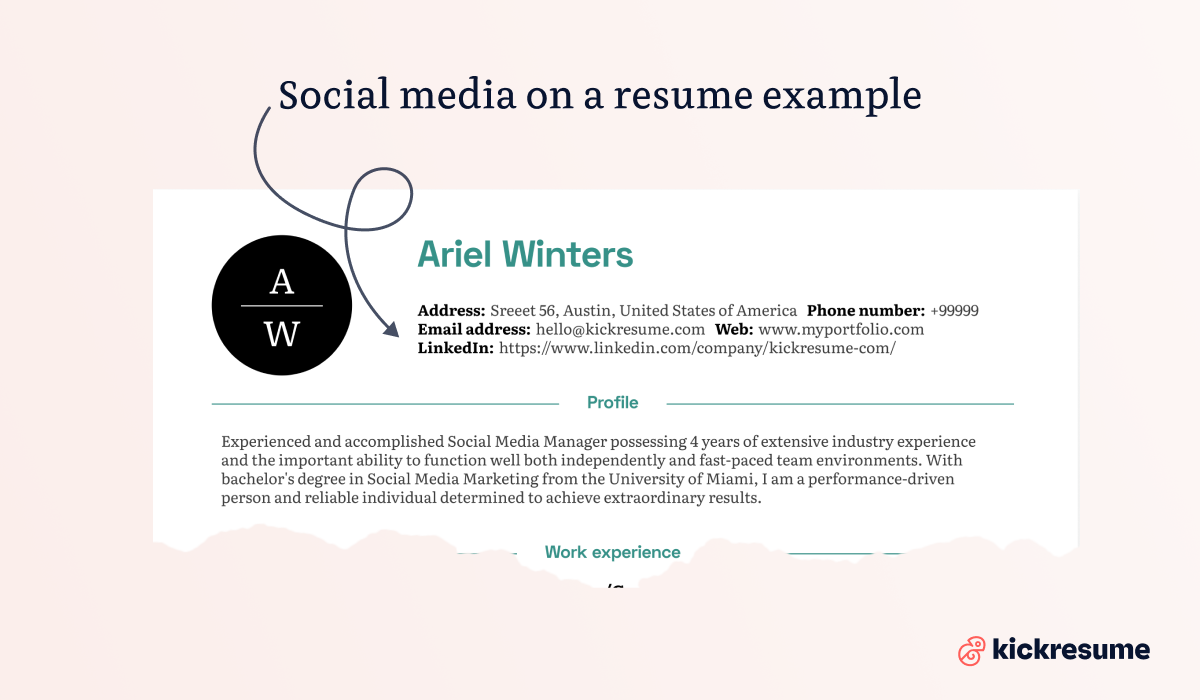
Second, an example of how social media can be included in the contact information section.
Why and how to put LinkedIn on a resume?
We chose to dedicate a separate chapter to LinkedIn, since this business-oriented online service has been ruling the hiring and networking world for a while now. And it’s not going away any time soon.
LinkedIn is a professional social networking platform which hosts more than 850 million professional profiles. In fact, three people are hired every minute for jobs on LinkedIn.
So, if you're asking whether you need a LinkedIn profile, the answer is yes. Even if you aren’t actively looking for a new job. And, if you don’t want to be an active user, at least don’t forget to update it anytime you have a new job, experience or achievement.
These are the main benefits of having a LinkedIn profile:
- You can find a new job. You can search LinkedIn’s job board and apply for jobs. Or even spy on companies you want to work for. Don't worry, it’s not stalking — it’s called research.
- A new job can find you. Even if you aren’t actively searching for a job, you can receive cool job offers from hiring managers. And there’s no harm in practicing your interview skills from time to time.
- Networking. You can connect with your former or current colleagues, employers, people you met at networking events or conferences. All of these connections may be helpful for your future career.
- Building your personal brand. Your personal online brand matters more than ever. On LinkedIn, you can also write your own industry-related articles and present yourself as a subject-matter expert.
- It will be easier to google you. Some employers can google you up before offering you a job. And your LinkedIn profile will most likely show up first.
When it comes to how to put LinkedIn on a resume, there's a few tips you should know about:
- Personalize the URL to make sure it doesn’t have a string of randomly generated numbers and letters before you add LinkedIn to your resume (open your web browser and go to Linkedin > Me > View Profile > Edit your custom URL).
- Include the short form of your LinkedIn URL to your resume. This means leaving out the unnecessary "https://".
- Alternatively, only include your LinkedIn name and add a hyperlink to it. However, if you're seeking a job in a big company and a little birdie tells you they use ATS, rather use the short form of your LinkedIn URL. This is due to the fact that ATS may remove the hyperlink before an employer opens your resume.
Social media skills on resume
Social media skills are becoming more and more important across tons of different jobs and industries.
Sure, they're a must-have if you're applying for a social media manager role, but they're also super valuable for jobs in digital marketing, content creation, PR, brand management, and other creative fields.
Companies know that strong social media skills can boost brand awareness, keep customers engaged, and help grow the business—so adding these to your resume can really work in your favor.
Here are some examples of social media skills which you can include in your resume:
- Social media content strategy
- Content creation and copywriting
- Social media platforms (Instagram, LinkedIn, TikTok, Facebook, X, Pinterest, YouTube)
- Social media management tools (Hootsuite, Buffer, Sprout Social, Later, Metricool)
- Analytics and reporting (Google Analytics, Meta Business Suite, native platform analytics)
- Community management and engagement
- Paid social media advertising (Facebook Ads, LinkedIn Ads, TikTok Ads)
- SEO and hashtag strategy
- Graphic design tools (Canva, Adobe Creative Suite, Figma)
- Video editing and creation (CapCut, Adobe Premiere, Final Cut Pro)
- Influencer outreach and collaboration
- Campaign planning and execution
- Brand voice development
How to list social media skills on a resume?
If you're working in social media, marketing, or anything related, here are two ways to show off your social media skills:
1. List social media skills in the skills section
A solid skills section will show employers what you bring to the table and help applicant tracking systems (ATS) pick up on your qualifications.
Make sure to include both:
- technical social media skills (specific platforms and tools)
- strategic social media skills (like content planning and creativity) that match what the job is looking for.
2. Create a separate social media resume section
This is a great way to show your real-world experience and highlight the accounts you're passionate about.
Whenever you can, include numbers to back it up (like "Managed Instagram account with 50K+ followers" or "Grew TikTok presence from 0 to 25K followers in 6 months").
Social media manager resume example
Want to see how this all comes together? Check out the social media manager resume example below, created using Kickresume templates.
It shows you how to place your social media skills strategically, highlight relevant experience, and include those impressive metrics that'll grab a hiring manager's attention.


Final piece of advice: Social media on resume
- Clean it up. Remove any controversial or offensive content from your social media. Drunk party photos, anything controversial or negative can cost you a job offer.
- Be consistent. Keep the info on your resume and online consistent. You should always tell the truth on your resume and the same applies to your social media profiles. Make sure your resume doesn’t tell one thing and your social media profiles another.
- Use social media as your portfolio. It’s the perfect place to integrate a seamless digital brand. Are you a graphic designer or photographer? Create a professional account on Instagram and use it as your digital portfolio.
- Try to google yourself, first. And spend some time going through the results. See what employers will find when they google you up. Manage your online presence, otherwise it could cost you a job offer.
- Stay objective and professional. While expressing your personality is important, remember that your social media profiles represent you professionally when included in your resume. Therefore, you need to make sure that your posts reflect professionalism and are in line with the objectives of the job you're applying for. Stick to industry-relevant topics, showcase your work, share related news, and join pertinent discussions.
This article was recently updated. The original article was written by Nikoleta Žišková in 2021.
![How to Write a Professional Resume Summary? [+Examples]](https://d2xe0iugdha6pz.cloudfront.net/article-small-images/How_to_Write_a_Professional_Resume_Summary_.png)

![How to Describe Your Work Experience on a Resume? [+Examples]](https://d2xe0iugdha6pz.cloudfront.net/article-small-images/How_to_Describe_Your_Work_Experience_on_a_Resume_.png)